mirror of
https://gitcode.com/gh_mirrors/fe/FERPlus.git
synced 2025-12-30 05:22:26 +00:00

75 lines
4.3 KiB
Markdown
75 lines
4.3 KiB
Markdown
# FER+
|
|
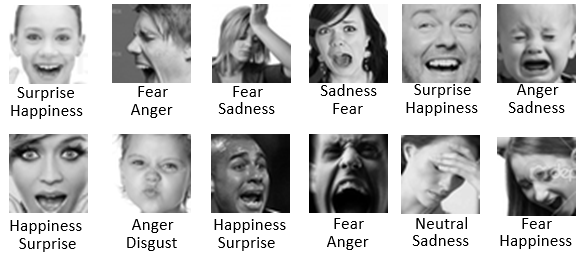
The FER+ annotations provide a set of new labels for the standard Emotion FER dataset. In FER+, each image has been labeled by 10 crowd-sourced taggers, which provide better quality ground truth for still image emotion than the original FER labels. Having 10 taggers for each image enables researchers to estimate an emotion probability distribution per face. This allows constructing algorithms that produce statistical distributions or multi-label outputs instead of the conventional single-label output, as described in: https://arxiv.org/abs/1608.01041
|
|
|
|
Here are some examples of the FER vs FER+ labels extracted from the abovementioned paper (FER top, FER+ bottom):
|
|
|
|
|
|
|
|
The new label file is named **_fer2013new.csv_** and contains the same number of rows as the original **_fer2013.csv_** label file with the same order, so that you infer which emotion tag belongs to which image. Since we can't host the actual image content, please find the original FER data set here: https://www.kaggle.com/c/challenges-in-representation-learning-facial-expression-recognition-challenge/data
|
|
|
|
The format of the CSV file is as follows: usage, neutral, happiness, surprise, sadness, anger, disgust, fear, contempt, unknown, NF. Columns "usage" is the same as the original FER label to differentiate between training, public test and private test sets. The other columns are the vote count for each emotion with the addition of unknown and NF (Not a Face).
|
|
|
|
## Training
|
|
We also provide a training code with implementation for all the training modes (majority, probability, cross entropy and multi-label) described in https://arxiv.org/abs/1608.01041. The training code uses MS Cognitive Toolkit (formerly CNTK) available in: https://github.com/Microsoft/CNTK.
|
|
|
|
After installing Cognitive Toolkit and downloading the dataset (we will discuss the dataset layout next), you can simply run the following to start the training:
|
|
|
|
#### For majority voting mode
|
|
```
|
|
python train.py -d <dataset base folder> -m majority
|
|
```
|
|
|
|
#### For probability mode
|
|
```
|
|
python train.py -d <dataset base folder> -m probability
|
|
```
|
|
|
|
#### For cross entropy mode
|
|
```
|
|
python train.py -d <dataset base folder> -m crossentropy
|
|
```
|
|
|
|
#### For multi-target mode
|
|
```
|
|
python train.py -d <dataset base folder> -m multi_target
|
|
```
|
|
|
|
## FER+ layout for Training
|
|
There is a folder named data that has the following layout:
|
|
|
|
```
|
|
/data
|
|
/FER2013Test
|
|
label.csv
|
|
/FER2013Train
|
|
label.csv
|
|
/FER2013Valid
|
|
label.csv
|
|
```
|
|
*label.csv* in each folder contains the actual label for each image, the image name is in the following format: ferXXXXXXXX.png, where XXXXXXXX is the row index of the original FER csv file. So here the names of the first few images:
|
|
|
|
```
|
|
fer0000000.png
|
|
fer0000001.png
|
|
fer0000002.png
|
|
fer0000003.png
|
|
```
|
|
The folders don't contain the actual images, you will need to download them from https://www.kaggle.com/c/challenges-in-representation-learning-facial-expression-recognition-challenge/data, then extract the images from the FER csv file in such a way, that all images corresponding to "Training" go to FER2013Train folder, all images corresponding to "PublicTest" go to FER2013Valid folder and all images corresponding to "PrivateTest" go to FER2013Test folder. Or you can use `generate_training_data.py` script to do all the above for you as mentioned in next section.
|
|
|
|
### Training data
|
|
We provide a simple script `generate_training_data.py` in python that takes **_fer2013.csv_** and **_fer2013new.csv_** as inputs, merge both CSV files and export all the images into a png files for the trainer to process.
|
|
|
|
```
|
|
python generate_training_data.py -d <dataset base folder> -fer <fer2013.csv path> -ferplus <fer2013new.csv path>
|
|
```
|
|
|
|
# Citation
|
|
If you use the new FER+ label or the sample code or part of it in your research, please cite the following:
|
|
|
|
**@inproceedings{BarsoumICMI2016,
|
|
title={Training Deep Networks for Facial Expression Recognition with Crowd-Sourced Label Distribution},
|
|
author={Barsoum, Emad and Zhang, Cha and Canton Ferrer, Cristian and Zhang, Zhengyou},
|
|
booktitle={ACM International Conference on Multimodal Interaction (ICMI)},
|
|
year={2016}
|
|
}**
|