简体中文 | [English](README_en.md)
# 人脸检测模型
* [1. 简介](#简介)
* [2. 模型库](#模型库)
* [3. 安装](#安装)
* [4. 数据准备](#数据准备)
* [5. 参数配置](#参数配置)
* [6. 训练与评估](#训练与评估)
* [6.1 训练](#训练)
* [6.2 在WIDER-FACE数据集上评估](#评估)
* [6.3 推理部署](#推理部署)
* [6.4 推理速度提升](#推理速度提升)
* [6.5 人脸检测demo](#人脸检测demo)
* [7. 参考文献](#参考文献)
## 1. 简介
`Arcface-Paddle`是基于PaddlePaddle实现的,开源深度人脸检测、识别工具。`Arcface-Paddle`目前提供了三个预训练模型,包括用于人脸检测的 `BlazeFace`、用于人脸识别的 `ArcFace` 和 `MobileFace`。
- 本部分内容为人脸检测部分,基于PaddleDetection进行开发。
- 人脸识别相关内容可以参考:[人脸识别](../../recognition/arcface_paddle/README_cn.md)。
- 基于PaddleInference的Whl包预测部署内容可以参考:[Whl包预测部署](https://github.com/littletomatodonkey/insight-face-paddle)。
## 2. 模型库
### WIDER-FACE数据集上的mAP
| 网络结构 | 输入尺寸 | 图片个数/GPU | epoch数量 | Easy/Medium/Hard Set | CPU预测时延 | GPU 预测时延 | 模型大小(MB) | 预训练模型地址 | inference模型地址 | 配置文件 |
|:------------:|:--------:|:----:|:-------:|:-------:|:-------:|:---------:|:----------:|:---------:|:---------:|:--------:|
| BlazeFace-FPN-SSH | 640 | 8 | 1000 | 0.9187 / 0.8979 / 0.8168 | 31.7ms | 5.6ms | 0.646 |[下载链接](https://paddledet.bj.bcebos.com/models/blazeface_fpn_ssh_1000e.pdparams) | [下载链接](https://paddle-model-ecology.bj.bcebos.com/model/insight-face/blazeface_fpn_ssh_1000e_v1.0_infer.tar) | [配置文件](https://github.com/PaddlePaddle/PaddleDetection/tree/release/2.1/configs/face_detection/blazeface_fpn_ssh_1000e.yml) |
| RetinaFace | 480x640 | - | - | - / - / 0.8250 | 182.0ms | 17.4ms | 1.680 | - | - | - |
**注意:**
- 我们使用多尺度评估策略得到`Easy/Medium/Hard Set`里的mAP。具体细节请参考[在WIDER-FACE数据集上评估](#评估)。
- 测量速度时我们使用640*640的分辨,在 Intel(R) Xeon(R) Gold 6148 CPU @ 2.40GHz cpu,CPU线程数设置为5,更多细节请参考[推理速度提升](#推理速度提升)。
- `RetinaFace`的速度测试代码参考自:[../retinaface/README.md](../retinaface/README.md).
- 测试环境为
- CPU: Intel(R) Xeon(R) Gold 6184 CPU @ 2.40GHz
- GPU: a single NVIDIA Tesla V100
## 3. 安装
请参考[安装教程](../../recognition/arcface_paddle/install_ch.md)安装PaddlePaddle以及PaddleDetection。
## 4. 数据准备
我们使用[WIDER-FACE数据集](http://shuoyang1213.me/WIDERFACE/)进行训练和模型测试,官方网站提供了详细的数据介绍。
- WIDER-Face数据源:
使用如下目录结构加载`wider_face`类型的数据集:
```
dataset/wider_face/
├── wider_face_split
│ ├── wider_face_train_bbx_gt.txt
│ ├── wider_face_val_bbx_gt.txt
├── WIDER_train
│ ├── images
│ │ ├── 0--Parade
│ │ │ ├── 0_Parade_marchingband_1_100.jpg
│ │ │ ├── 0_Parade_marchingband_1_381.jpg
│ │ │ │ ...
│ │ ├── 10--People_Marching
│ │ │ ...
├── WIDER_val
│ ├── images
│ │ ├── 0--Parade
│ │ │ ├── 0_Parade_marchingband_1_1004.jpg
│ │ │ ├── 0_Parade_marchingband_1_1045.jpg
│ │ │ │ ...
│ │ ├── 10--People_Marching
│ │ │ ...
```
- 手动下载数据集:
要下载WIDER-FACE数据集,请运行以下命令:
```
cd dataset/wider_face && ./download_wider_face.sh
```
## 5. 参数配置
我们使用 `configs/face_detection/blazeface_fpn_ssh_1000e.yml`配置进行训练,配置文件摘要如下:
```yaml
_BASE_: [
'../datasets/wider_face.yml',
'../runtime.yml',
'_base_/optimizer_1000e.yml',
'_base_/blazeface_fpn.yml',
'_base_/face_reader.yml',
]
weights: output/blazeface_fpn_ssh_1000e/model_final
multi_scale_eval: True
```
`blazeface_fpn_ssh_1000e.yml` 配置需要依赖其他的配置文件,在该例子中需要依赖:
```
wider_face.yml:主要说明了训练数据和验证数据的路径
runtime.yml:主要说明了公共的运行参数,比如是否使用GPU、每多少个epoch存储checkpoint等
optimizer_1000e.yml:主要说明了学习率和优化器的配置
blazeface_fpn.yml:主要说明模型和主干网络的情况
face_reader.yml:主要说明数据读取器配置,如batch size,并发加载子进程数等,同时包含读取后预处理操作,如resize、数据增强等等
```
根据实际情况,修改上述文件,比如数据集路径、batch size等。
基础模型的配置可以参考`configs/face_detection/_base_/blazeface.yml`;
改进模型增加FPN和SSH的neck结构,配置文件可以参考`configs/face_detection/_base_/blazeface_fpn.yml`,可以根据需求配置FPN和SSH,具体如下:
```yaml
BlazeNet:
blaze_filters: [[24, 24], [24, 24], [24, 48, 2], [48, 48], [48, 48]]
double_blaze_filters: [[48, 24, 96, 2], [96, 24, 96], [96, 24, 96],
[96, 24, 96, 2], [96, 24, 96], [96, 24, 96]]
act: hard_swish # 配置backbone中BlazeBlock的激活函数,基础模型为relu,增加FPN和SSH时需使用hard_swish
BlazeNeck:
neck_type : fpn_ssh # 可选only_fpn、only_ssh和fpn_ssh
in_channel: [96,96]
```
## 6. 训练与评估
### 6.1 训练
首先,下载预训练模型文件:
```bash
wget https://paddledet.bj.bcebos.com/models/pretrained/blazenet_pretrain.pdparams
```
PaddleDetection提供了单卡/多卡训练模式,满足用户多种训练需求
* GPU单卡训练
```bash
export CUDA_VISIBLE_DEVICES=0 #windows和Mac下不需要执行该命令
python tools/train.py -c configs/face_detection/blazeface_fpn_ssh_1000e.yml -o pretrain_weight=blazenet_pretrain
```
* GPU多卡训练
```bash
export CUDA_VISIBLE_DEVICES=0,1,2,3 #windows和Mac下不需要执行该命令
python -m paddle.distributed.launch --gpus 0,1,2,3 tools/train.py -c configs/face_detection/blazeface_fpn_ssh_1000e.yml -o pretrain_weight=blazenet_pretrain
```
* 模型恢复训练
在日常训练过程中,有的用户由于一些原因导致训练中断,用户可以使用-r的命令恢复训练
```bash
export CUDA_VISIBLE_DEVICES=0 #windows和Mac下不需要执行该命令
python tools/train.py -c configs/face_detection/blazeface_fpn_ssh_1000e.yml -r output/blazeface_fan_ssh_1000e/100
```
* 训练策略
`BlazeFace`训练是以每卡`batch_size=32`在4卡GPU上进行训练(总`batch_size`是128),学习率为0.002,并且训练1000epoch。
**注意:** 人脸检测模型目前不支持边训练边评估。
### 6.2 在WIDER-FACE数据集上评估
- 步骤一:评估并生成结果文件:
```shell
python -u tools/eval.py -c configs/face_detection/blazeface_fpn_ssh_1000e.yml \
-o weights=output/blazeface_fpn_ssh_1000e/model_final \
multi_scale_eval=True BBoxPostProcess.nms.score_threshold=0.1
```
设置`multi_scale_eval=True`进行多尺度评估,评估完成后,将在`output/pred`中生成txt格式的测试结果。
- 步骤二:下载官方评估脚本和Ground Truth文件:
```
wget http://mmlab.ie.cuhk.edu.hk/projects/WIDERFace/support/eval_script/eval_tools.zip
unzip eval_tools.zip && rm -f eval_tools.zip
```
- 步骤三:开始评估
方法一:python评估。
```bash
git clone https://github.com/wondervictor/WiderFace-Evaluation.git
cd WiderFace-Evaluation
# 编译
python3 setup.py build_ext --inplace
# 开始评估
python3 evaluation.py -p /path/to/PaddleDetection/output/pred -g /path/to/eval_tools/ground_truth
```
方法二:MatLab评估。
```bash
# 在`eval_tools/wider_eval.m`中修改保存结果路径和绘制曲线的名称:
pred_dir = './pred';
legend_name = 'Paddle-BlazeFace';
`wider_eval.m` 是评估模块的主要执行程序。运行命令如下:
matlab -nodesktop -nosplash -nojvm -r "run wider_eval.m;quit;"
```
### 6.3 推理部署
在模型训练过程中保存的模型文件是包含前向预测和反向传播的过程,在实际的工业部署则不需要反向传播,因此需要将模型进行导成部署需要的模型格式。
在PaddleDetection中提供了 `tools/export_model.py`脚本来导出模型
```bash
python tools/export_model.py -c configs/face_detection/blazeface_fpn_ssh_1000e.yml --output_dir=./inference_model \
-o weights=output/blazeface_fpn_ssh_1000e/best_model BBoxPostProcess.nms.score_threshold=0.1
```
预测模型会导出到`inference_model/blazeface_fpn_ssh_1000e`目录下,分别为`infer_cfg.yml`, `model.pdiparams`, `model.pdiparams.info`,`model.pdmodel` 如果不指定文件夹,模型则会导出在`output_inference`
* 这里将nms后处理`score_threshold`修改为0.1,因为mAP基本没有影响的情况下,GPU预测速度能够大幅提升。更多关于模型导出的文档,请参考[模型导出文档](https://github.com/PaddlePaddle/PaddleDetection/deploy/EXPORT_MODEL.md)
PaddleDetection提供了PaddleInference、PaddleServing、PaddleLite多种部署形式,支持服务端、移动端、嵌入式等多种平台,提供了完善的Python和C++部署方案。
* 在这里,我们以Python为例,说明如何使用PaddleInference进行模型部署
```bash
python deploy/python/infer.py --model_dir=./inference_model/blazeface_fpn_ssh_1000e --image_file=demo/road554.png --use_gpu=True
```
* 同时`infer.py`提供了丰富的接口,用户进行接入视频文件、摄像头进行预测,更多内容请参考[Python端预测部署](https://github.com/PaddlePaddle/PaddleDetection/deploy/python.md)
* 更多关于预测部署的文档,请参考[预测部署文档](https://github.com/PaddlePaddle/PaddleDetection/deploy/README.md) 。
### 6.4 推理速度提升
如果想要复现我们提供的速度指标,请修改预测模型配置文件`./inference_model/blazeface_fpn_ssh_1000e/infer_cfg.yml`中的输入尺寸,如下所示:
```yaml
mode: fluid
draw_threshold: 0.5
metric: WiderFace
arch: Face
min_subgraph_size: 3
Preprocess:
- is_scale: false
mean:
- 123
- 117
- 104
std:
- 127.502231
- 127.502231
- 127.502231
type: NormalizeImage
- interp: 1
keep_ratio: false
target_size:
- 640
- 640
type: Resize
- type: Permute
label_list:
- face
```
如果希望模型在cpu环境下更快推理,可安装[paddlepaddle_gpu-0.0.0](https://paddle-wheel.bj.bcebos.com/develop-cpu-mkl/paddlepaddle-0.0.0-cp37-cp37m-linux_x86_64.whl) (mkldnn的依赖)可开启mkldnn加速推理。
```bash
# 使用GPU测速:
python deploy/python/infer.py --model_dir=./inference_model/blazeface_fpn_ssh_1000e --image_dir=./path/images --run_benchmark=True --use_gpu=True
# 使用cpu测速:
# 下载paddle whl包
wget https://paddle-wheel.bj.bcebos.com/develop-cpu-mkl/paddlepaddle-0.0.0-cp37-cp37m-linux_x86_64.whl
# 安装paddlepaddle_gpu-0.0.0
pip install paddlepaddle-0.0.0-cp37-cp37m-linux_x86_64.whl
# 推理
python deploy/python/infer.py --model_dir=./inference_model/blazeface_fpn_ssh_1000e --image_dir=./path/images --enable_mkldnn=True --run_benchmark=True --cpu_threads=5
```
### 6.5 人脸检测demo
本节介绍基于提供的BlazeFace模型进行人脸检测。
先下载待检测图像与字体文件。
```bash
# 下载用于人脸检测的示例图像
wget https://raw.githubusercontent.com/littletomatodonkey/insight-face-paddle/main/demo/friends/query/friends1.jpg
# 下载字体,用于可视化
wget https://raw.githubusercontent.com/littletomatodonkey/insight-face-paddle/main/SourceHanSansCN-Medium.otf
```
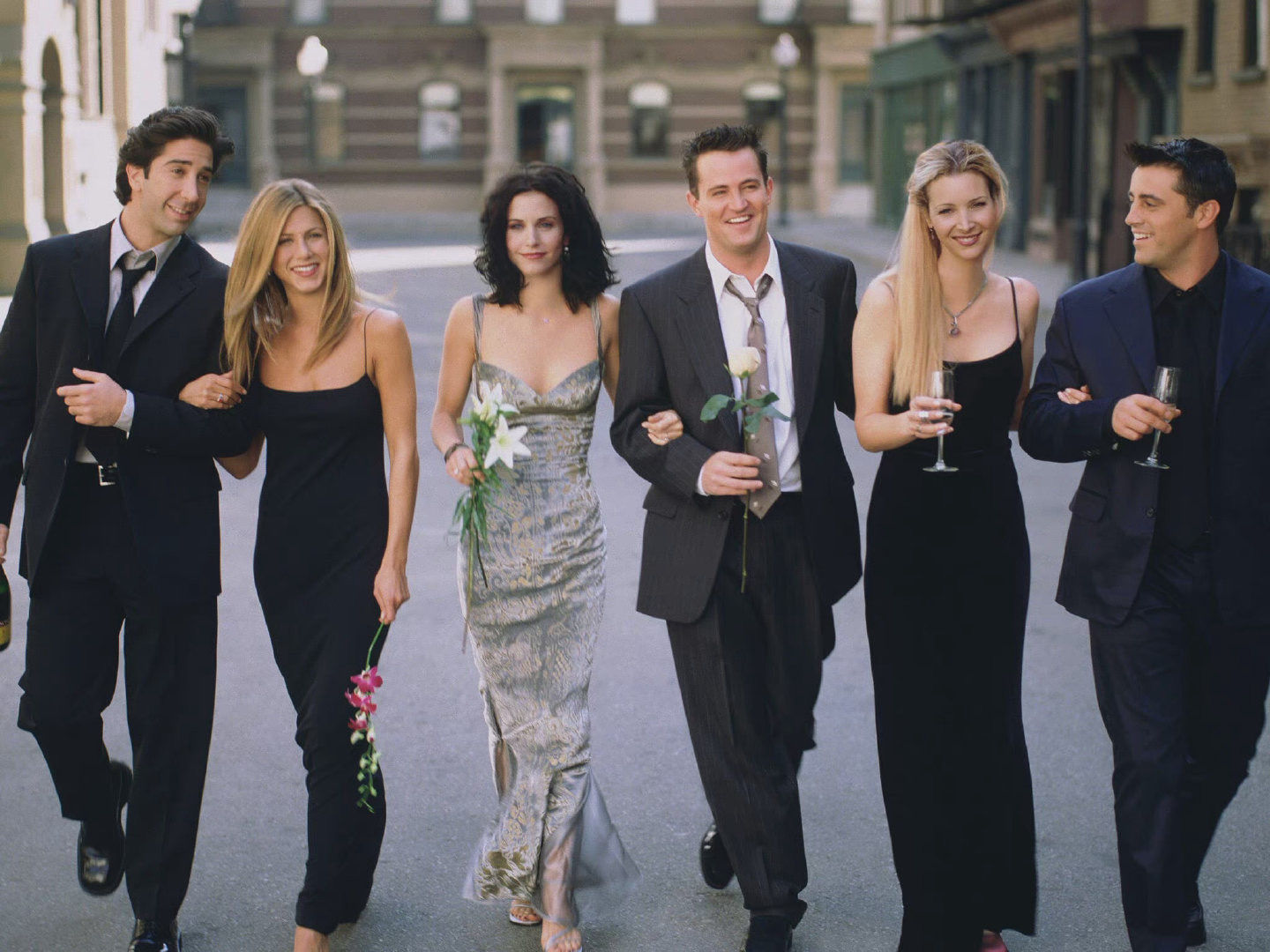
示例图像如下所示。
检测的示例命令如下。
```shell
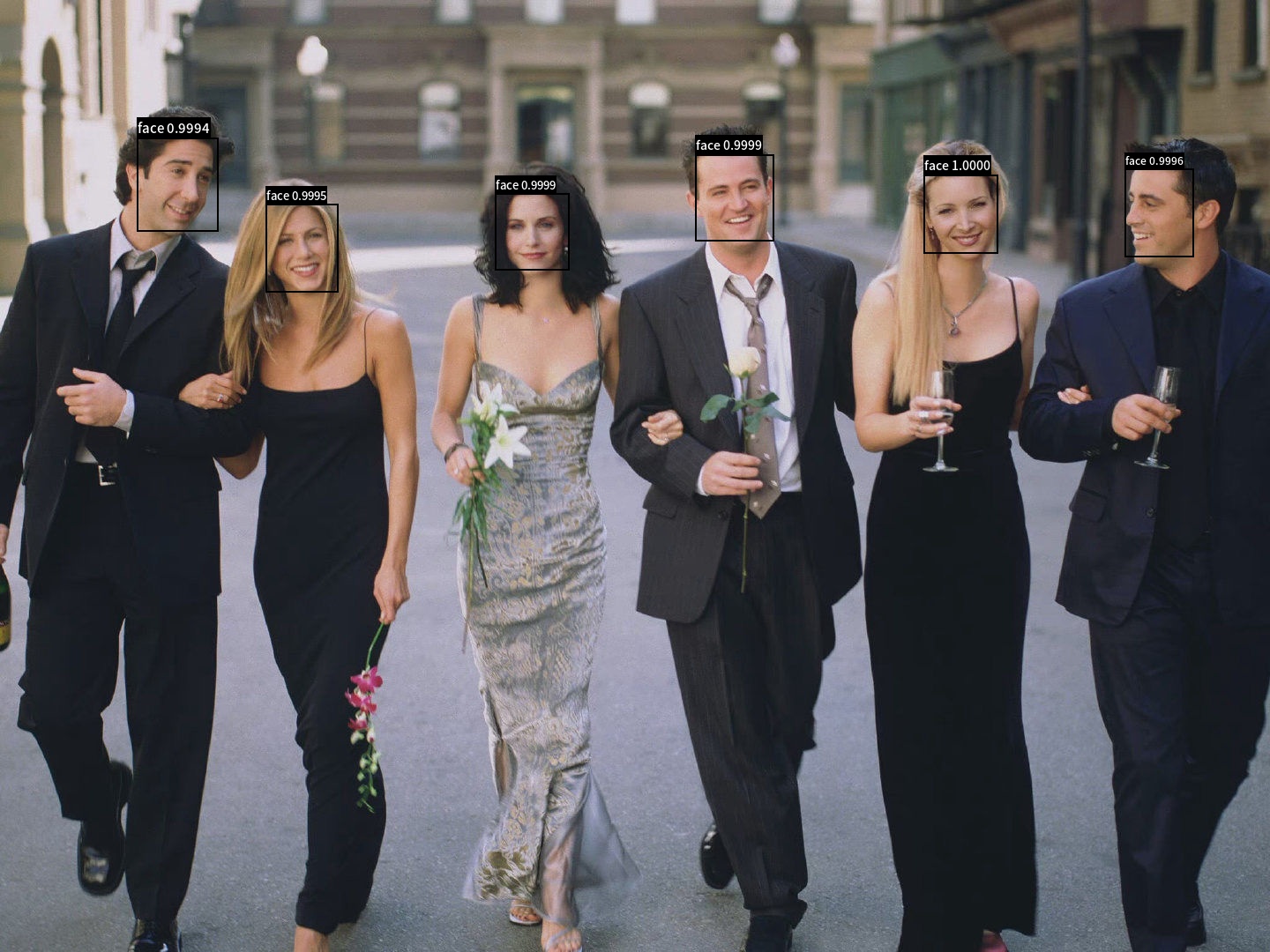
python3.7 test_blazeface.py --input=friends1.jpg --output="./output"
```
最终可视化结果保存在`output`目录下,可视化结果如下所示。
更多关于参数解释,索引库构建、人脸识别、whl包预测部署的内容可以参考:[Whl包预测部署](https://github.com/littletomatodonkey/insight-face-paddle)。
## 7. 参考文献
```
@misc{long2020ppyolo,
title={PP-YOLO: An Effective and Efficient Implementation of Object Detector},
author={Xiang Long and Kaipeng Deng and Guanzhong Wang and Yang Zhang and Qingqing Dang and Yuan Gao and Hui Shen and Jianguo Ren and Shumin Han and Errui Ding and Shilei Wen},
year={2020},
eprint={2007.12099},
archivePrefix={arXiv},
primaryClass={cs.CV}
}
@misc{ppdet2019,
title={PaddleDetection, Object detection and instance segmentation toolkit based on PaddlePaddle.},
author={PaddlePaddle Authors},
howpublished = {\url{https://github.com/PaddlePaddle/PaddleDetection}},
year={2019}
}
@article{bazarevsky2019blazeface,
title={BlazeFace: Sub-millisecond Neural Face Detection on Mobile GPUs},
author={Valentin Bazarevsky and Yury Kartynnik and Andrey Vakunov and Karthik Raveendran and Matthias Grundmann},
year={2019},
eprint={1907.05047},
archivePrefix={arXiv}
}
```