[简体中文](README_cn.md) | English
# FaceDetection
* [1. Introduction](#Introduction)
* [2. Model Zoo](#Model_Zoo)
* [3. Installation](#Installation)
* [4. Data Pipline](#Data_Pipline)
* [5. Configuration File](#Configuration_File)
* [6. Training and Inference](#Training_and_Inference)
* [6.1 Training](#Training)
* [6.2 Evaluate on the WIDER FACE](#Evaluation)
* [6.3 Inference deployment](#Inference_deployment)
* [6.4 Improvement of inference speed](#Increase_in_inference_speed)
* [6.4 Face detection demo](#Face_detection_demo)
* [7. Citations](#Citations)
## 1. Introduction
`Arcface-Paddle` is an open source deep face detection and recognition toolkit, powered by PaddlePaddle. `Arcface-Paddle` provides three related pretrained models now, include `BlazeFace` for face detection, `ArcFace` and `MobileFace` for face recognition.
- This tutorial is mainly about face detection based on `PaddleDetection`.
- For face recognition task, please refer to: [Face recognition tuturial](../../recognition/arcface_paddle/README_en.md).
- For Whl package inference using PaddleInference, please refer to [whl package inference](https://github.com/littletomatodonkey/insight-face-paddle).
## 2. Model Zoo
### mAP in WIDER FACE
| Model | input size | images/GPU | epochs | Easy/Medium/Hard Set | CPU time cost | GPU time cost| Model Size(MB) | Pretrained model | Inference model | Config |
|:------------:|:--------:|:----:|:-------:|:-------:|:---------:|:---------:|:----------:|:---------:|:--------:|:--------:|
| BlazeFace-FPN-SSH | 640×640 | 8 | 1000 | 0.9187 / 0.8979 / 0.8168 | 31.7ms | 5.6ms | 0.646 |[download link](https://paddledet.bj.bcebos.com/models/blazeface_fpn_ssh_1000e.pdparams) | [download link](https://paddle-model-ecology.bj.bcebos.com/model/insight-face/blazeface_fpn_ssh_1000e_v1.0_infer.tar) | [config](https://github.com/PaddlePaddle/PaddleDetection/tree/release/2.1/configs/face_detection/blazeface_fpn_ssh_1000e.yml) |
| RetinaFace | 480x640 | - | - | - / - / 0.8250 | 182.0ms | 17.4ms | 1.680 | - | - | - |
**NOTE:**
- Get mAP in `Easy/Medium/Hard Set` by multi-scale evaluation. For details can refer to [Evaluation](#Evaluate-on-the-WIDER-FACE).
- Measuring the speed, we use the resolution of `640×640`, in Intel(R) Xeon(R) Gold 6148 CPU @ 2.40GHz environment, cpu-threads are set as 5. For more details, you can refer to [Improvement of inference speed](#Increase_in_inference_speed).
- Benchmark code for `RetinaFace` is from: [../retinaface/README.md](../retinaface/README.md).
- The benchmark environment is
- CPU: Intel(R) Xeon(R) Gold 6184 CPU @ 2.40GHz
- GPU: a single NVIDIA Tesla V100
## 3. Installation
Please refer to [installation tutorial](../../recognition/arcface_paddle/install_en.md) to install PaddlePaddle and PaddleDetection.
## 4. Data Pipline
We use the [WIDER FACE dataset](http://shuoyang1213.me/WIDERFACE/) to carry out the training
and testing of the model, the official website gives detailed data introduction.
- WIDER Face data source:
Loads `wider_face` type dataset with directory structures like this:
```
dataset/wider_face/
├── wider_face_split
│ ├── wider_face_train_bbx_gt.txt
│ ├── wider_face_val_bbx_gt.txt
├── WIDER_train
│ ├── images
│ │ ├── 0--Parade
│ │ │ ├── 0_Parade_marchingband_1_100.jpg
│ │ │ ├── 0_Parade_marchingband_1_381.jpg
│ │ │ │ ...
│ │ ├── 10--People_Marching
│ │ │ ...
├── WIDER_val
│ ├── images
│ │ ├── 0--Parade
│ │ │ ├── 0_Parade_marchingband_1_1004.jpg
│ │ │ ├── 0_Parade_marchingband_1_1045.jpg
│ │ │ │ ...
│ │ ├── 10--People_Marching
│ │ │ ...
```
- Download dataset manually:
To download the WIDER FACE dataset, run the following commands:
```
cd dataset/wider_face && ./download_wider_face.sh
```
## 5. Configuration file
We use the `configs/face_detection/blazeface_fpn_ssh_1000e.yml` configuration for training. The summary of the configuration file is as follows:
```yaml
_BASE_: [
'../datasets/wider_face.yml',
'../runtime.yml',
'_base_/optimizer_1000e.yml',
'_base_/blazeface_fpn.yml',
'_base_/face_reader.yml',
]
weights: output/blazeface_fpn_ssh_1000e/model_final
multi_scale_eval: True
```
`blazeface_fpn_ssh_1000e.yml` The configuration needs to rely on other configuration files, in this example it needs to rely on:
```
wider_face.yml:Mainly explains the path of training data and verification data
runtime.yml:Mainly describes the common operating parameters, such as whether to use GPU, how many epochs to store checkpoints, etc.
optimizer_1000e.yml:Mainly explains the configuration of learning rate and optimizer
blazeface_fpn.yml:Mainly explain the situation of the model and the backbone network
face_reader.yml:It mainly describes the configuration of the data reader, such as batch size, the number of concurrent loading subprocesses, etc., and also includes post-reading preprocessing operations, such as resize, data enhancement, etc.
```
According to the actual situation, modify the above files, such as the data set path, batch size, etc.
For the configuration of the base model, please refer to `configs/face_detection/_base_/blazeface.yml`.
The improved model adds the neck structure of FPN and SSH. For the configuration file, please refer to `configs/face_detection/_base_/blazeface_fpn.yml`. You can configure FPN and SSH if needed, which is as follows:
```yaml
BlazeNet:
blaze_filters: [[24, 24], [24, 24], [24, 48, 2], [48, 48], [48, 48]]
double_blaze_filters: [[48, 24, 96, 2], [96, 24, 96], [96, 24, 96],
[96, 24, 96, 2], [96, 24, 96], [96, 24, 96]]
act: hard_swish # Configure the activation function of BlazeBlock in backbone, the basic model is relu, hard_swish is required when adding FPN and SSH
BlazeNeck:
neck_type : fpn_ssh # Optional only_fpn, only_ssh and fpn_ssh
in_channel: [96,96]
```
## 6. Training_and_Inference
### 6.1 Training
Firstly, download the pretrained model.
```bash
wget https://paddledet.bj.bcebos.com/models/pretrained/blazenet_pretrain.pdparams
```
PaddleDetection provides a single-GPU/multi-GPU training mode to meet the various training needs of users.
* single-GPU training
```bash
export CUDA_VISIBLE_DEVICES=0 # Do not need to execute this command under windows and Mac
python tools/train.py -c configs/face_detection/blazeface_fpn_ssh_1000e.yml -o pretrain_weight=blazenet_pretrain
```
* multi-GPU training
```bash
export CUDA_VISIBLE_DEVICES=0,1,2,3 # Do not need to execute this command under windows and Mac
python -m paddle.distributed.launch --gpus 0,1,2,3 tools/train.py -c configs/face_detection/blazeface_fpn_ssh_1000e.yml -o pretrain_weight=blazenet_pretrain
```
* Resume training from Checkpoint
In the daily training process, if the training was be interrupted, using the -r command to resume training:
```bash
export CUDA_VISIBLE_DEVICES=0 # Do not need to execute this command under windows and Mac
python tools/train.py -c configs/face_detection/blazeface_fpn_ssh_1000e.yml -r output/blazeface_fan_ssh_1000e/100
```
* Training hyperparameters
`BlazeFace` training is based on each GPU `batch_size=32` training on 4 GPUs (total `batch_size` is 128), the learning rate is 0.002, and the total training epoch is set as 1000.
**NOTE:** Not support evaluation during train.
### 6.2 Evaluate on the WIDER FACE
- Evaluate and generate results files:
```shell
python -u tools/eval.py -c configs/face_detection/blazeface_fpn_ssh_1000e.yml \
-o weights=output/blazeface_fpn_ssh_1000e/model_final \
multi_scale_eval=True BBoxPostProcess.nms.score_threshold=0.1
```
Set `multi_scale_eval=True` for multi-scale evaluation,after the evaluation is completed, the test result in txt format will be generated in `output/pred`.
- Download the official evaluation script to evaluate the AP metrics:
```bash
wget http://mmlab.ie.cuhk.edu.hk/projects/WIDERFace/support/eval_script/eval_tools.zip
unzip eval_tools.zip && rm -f eval_tools.zip
```
- Start evaluation:
Method One: Python evaluation:
```bash
git clone https://github.com/wondervictor/WiderFace-Evaluation.git
cd WiderFace-Evaluation
# Compile
python3 setup.py build_ext --inplace
# Start evaluation
python3 evaluation.py -p /path/to/PaddleDetection/output/pred -g /path/to/eval_tools/ground_truth
```
Method Two: MatLab evaluation:
```bash
# Modify the result path and the name of the curve to be drawn in `eval_tools/wider_eval.m`:
pred_dir = './pred';
legend_name = 'Paddle-BlazeFace';
`wider_eval.m` is the main execution program of the evaluation module. The run command is as follows:
matlab -nodesktop -nosplash -nojvm -r "run wider_eval.m;quit;"
```
### 6.3 Inference deployment
The model file saved in the model training process includes forward prediction and back propagation. In actual industrial deployment, back propagation is not required. Therefore, the model needs to be exported into the model format required for deployment.
The `tools/export_model.py` script is provided in PaddleDetection to export the model:
```bash
python tools/export_model.py -c configs/face_detection/blazeface_fpn_ssh_1000e.yml --output_dir=./inference_model \
-o weights=output/blazeface_fpn_ssh_1000e/best_model BBoxPostProcess.nms.score_threshold=0.1
```
The inference model will be exported to the `inference_model/blazeface_fpn_ssh_1000e` directory, which are `infer_cfg.yml`, `model.pdiparams`, `model.pdiparams.info`, `model.pdmodel` If no folder is specified, the model will be exported In `output_inference`.
* `score_threshold` for nms is modified as 0.1 for inference, because it takes great speed performance improvement while has little effect on mAP. For more documentation about model export, please refer to: [export doc](https://github.com/PaddlePaddle/PaddleDetection/deploy/EXPORT_MODEL.md)
PaddleDetection provides multiple deployment forms of PaddleInference, PaddleServing, and PaddleLite, supports multiple platforms such as server, mobile, and embedded, and provides a complete deployment plan for Python and C++.
* Here, we take Python as an example to illustrate how to use PaddleInference for model deployment:
```bash
python deploy/python/infer.py --model_dir=./inference_model/blazeface_fpn_ssh_1000e --image_file=demo/road554.png --use_gpu=True
```
* `infer.py` provides a rich interface for users to access video files and cameras for prediction. For more information, please refer to: [Python deployment](https://github.com/PaddlePaddle/PaddleDetection/deploy/python.md).
* For more documentation on deployment, please refer to: [deploy doc](https://github.com/PaddlePaddle/PaddleDetection/deploy/README.md).
### 6.4 Improvement of inference speed
If you want to reproduce our speed indicators, you need to modify the input size of inference model in the `./inference_model/blazeface_fpn_ssh_1000e/infer_cfg.yml` configuration file. As follows:
```yaml
mode: fluid
draw_threshold: 0.5
metric: WiderFace
arch: Face
min_subgraph_size: 3
Preprocess:
- is_scale: false
mean:
- 123
- 117
- 104
std:
- 127.502231
- 127.502231
- 127.502231
type: NormalizeImage
- interp: 1
keep_ratio: false
target_size:
- 640
- 640
type: Resize
- type: Permute
label_list:
- face
```
If you want the model to be inferred faster in the CPU environment, install [paddlepaddle_gpu-0.0.0](https://paddle-wheel.bj.bcebos.com/develop-cpu-mkl/paddlepaddle-0.0.0-cp37-cp37m-linux_x86_64.whl) (dependency of mkldnn) and enable_mkldnn is set to True, when predicting acceleration.
```bash
# use GPU:
python deploy/python/infer.py --model_dir=./inference_model/blazeface_fpn_ssh_1000e --image_dir=./path/images --run_benchmark=True --use_gpu=True
# inference with mkldnn use CPU
# downdoad whl package
wget https://paddle-wheel.bj.bcebos.com/develop-cpu-mkl/paddlepaddle-0.0.0-cp37-cp37m-linux_x86_64.whl
#install paddlepaddle_gpu-0.0.0
pip install paddlepaddle-0.0.0-cp37-cp37m-linux_x86_64.whl
python deploy/python/infer.py --model_dir=./inference_model/blazeface_fpn_ssh_1000e --image_dir=./path/images --enable_mkldnn=True --run_benchmark=True --cpu_threads=5
```
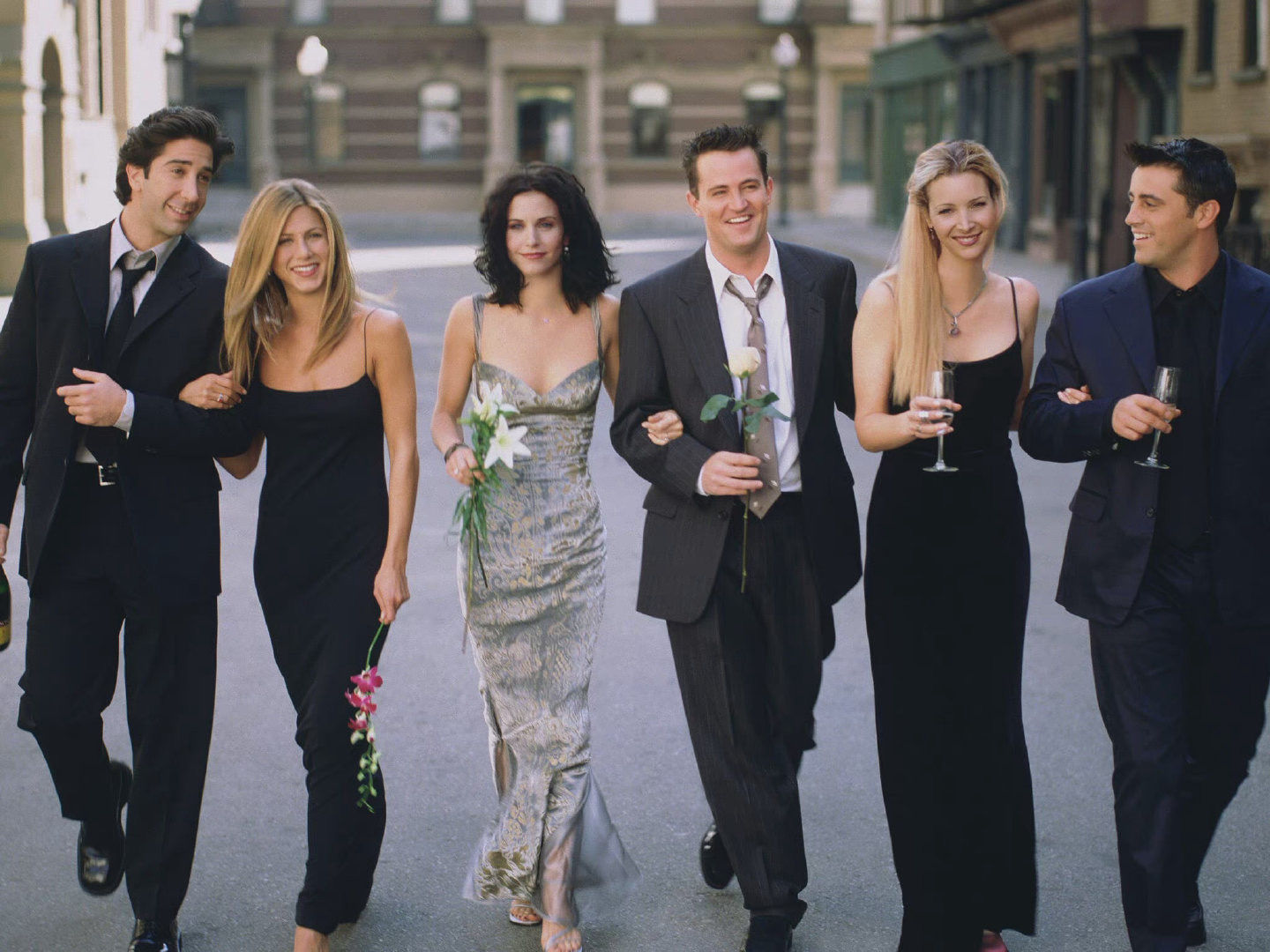
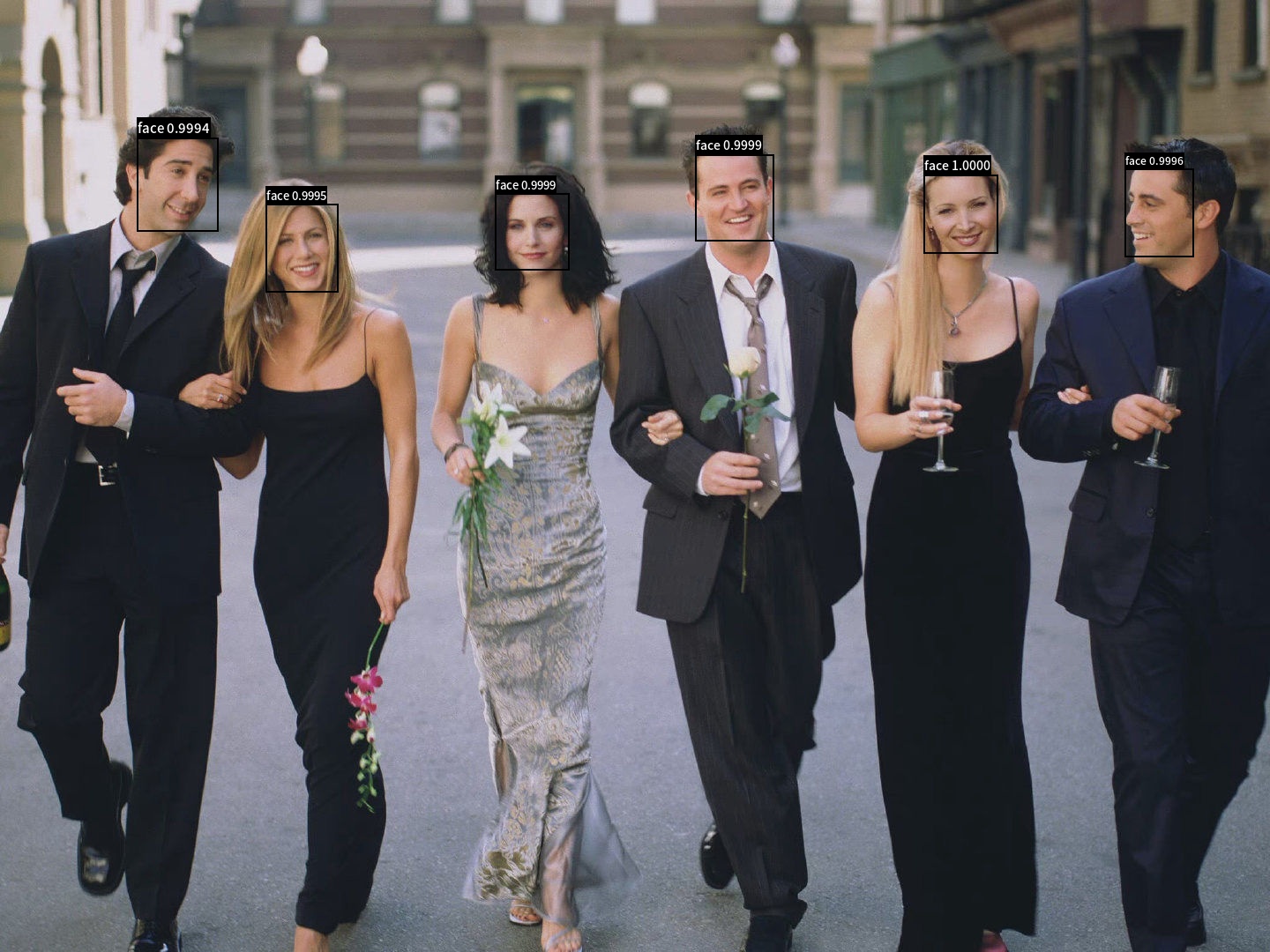
### 6.5 Face detection demo
This part talks about how to detect faces using BlazeFace model.
Firstly, use the following commands to download the demo image and font file for visualization.
```bash
# Demo image
wget https://raw.githubusercontent.com/littletomatodonkey/insight-face-paddle/main/demo/friends/query/friends1.jpg
# Font file for visualization
wget https://raw.githubusercontent.com/littletomatodonkey/insight-face-paddle/main/SourceHanSansCN-Medium.otf
```
The demo image is shown as follows.
Use the following command to run the face detection process.
```shell
python3.7 test_blazeface.py --input=friends1.jpg --output="./output"
```
The final result is save in folder `output/`, which is shown as follows.
For more details about parameter explanations, face recognition, index gallery construction and whl package inference, please refer to [Whl package inference tutorial](https://github.com/littletomatodonkey/insight-face-paddle).
## 7. Citations
```
@misc{long2020ppyolo,
title={PP-YOLO: An Effective and Efficient Implementation of Object Detector},
author={Xiang Long and Kaipeng Deng and Guanzhong Wang and Yang Zhang and Qingqing Dang and Yuan Gao and Hui Shen and Jianguo Ren and Shumin Han and Errui Ding and Shilei Wen},
year={2020},
eprint={2007.12099},
archivePrefix={arXiv},
primaryClass={cs.CV}
}
@misc{ppdet2019,
title={PaddleDetection, Object detection and instance segmentation toolkit based on PaddlePaddle.},
author={PaddlePaddle Authors},
howpublished = {\url{https://github.com/PaddlePaddle/PaddleDetection}},
year={2019}
}
@article{bazarevsky2019blazeface,
title={BlazeFace: Sub-millisecond Neural Face Detection on Mobile GPUs},
author={Valentin Bazarevsky and Yury Kartynnik and Andrey Vakunov and Karthik Raveendran and Matthias Grundmann},
year={2019},
eprint={1907.05047},
archivePrefix={arXiv}
}
```