
简体中文 | English
Arcface-Paddle
1. Introduction
Arcface-Paddle is an open source deep face detection and recognition toolkit, powered by PaddlePaddle. Arcface-Paddle provides three related pretrained models now, include BlazeFace for face detection, ArcFace and MobileFace for face recognition.
- This tutorial is mainly about face recognition.
- For face detection task, please refer to: Face detection tuturial.
- For Whl package inference using PaddleInference, please refer to whl package inference.
Note: Many thanks to GuoQuanhao for the reproduction of the Arcface basline using PaddlePaddle.
2. Environment preparation
Please refer to Installation to setup environment at first.
3. Data preparation
3.1 Enter recognition dir.
cd arcface_paddle/rec
3.2 Download and unzip dataset
Use the following command to download and unzip MS1M dataset.
# download dataset
wget https://paddle-model-ecology.bj.bcebos.com/data/insight-face/MS1M_bin.tar
# unzip dataset
tar -xf MS1M_bin.tar
Note:
- If you want to install
wgeton Windows, please refer to link. If you want to installtaron Windows. please refer to link. - If
wgetis not installed on macOS, you can use the following command to install.
# install homebrew
ruby -e "$(curl -fsSL https://raw.githubusercontent.com/Homebrew/install/master/install)";
# install wget
brew install wget
After finishing unzipping the dataset, the folder structure is as follows.
Arcface-Paddle/MSiM_bin
|_ images
|  |_ 00000000.bin
|  |_ ...
|  |_ 05822652.bin
|_ label.txt
|_ agedb_30.bin
|_ cfp_ff.bin
|_ cfp_fp.bin
|_ lfw.bin
-
Label file format is as follows.
 # delimiter: "\t"
 # the following the content of label.txt
 images/00000000.bin 0
 ...
If you want to use customed dataset, you can arrange your data according to the above format. And should replace data folder in the configuration using yours.
Note:
- For using
Dataloaderapi for reading data, we converttrain.recinto many littlebinfiles, eachbinfile denotes a single image. If your dataset just contains origin image files. You can either rewrite the dataloader file or refer to section 3.3 to convert the original image files tobinfiles. - If you train data is image format rather than
binformat. For the training process, you just need to set the parameteris_binasFalse. More details can be seen in the following training script.
3.3 Transform between original image files and bin files
If you want to convert original image files to bin files used directly for training process, you can use the following command to finish the conversion.
python3.7 tools/convert_image_bin.py --image_path="your/input/image/path" --bin_path="your/output/bin/path" --mode="image2bin"
If you want to convert bin files to original image files, you can use the following command to finish the conversion.
python3.7 tools/convert_image_bin.py --image_path="your/input/bin/path" --bin_path="your/output/image/path" --mode="bin2image"
4. Model training
After preparing the configuration file, The training process can be started in the following way.
# for the bin format training data
python3.7 train.py \
    --network 'MobileFaceNet_128' \
    --lr=0.1 \
    --batch_size 512 \
    --weight_decay 2e-4 \
    --embedding_size 128 \
    --logdir="log" \
    --output "emore_arcface" \
    --resume 0

# for the original image format training data
python3.7 train.py \
    --network 'MobileFaceNet_128' \
    --lr=0.1 \
    --batch_size 512 \
    --weight_decay 2e-4 \
    --embedding_size 128 \
    --logdir="log" \
    --output "emore_arcface" \
    --resume 0 \
    --is_bin False
Among them:
network: Model name, such asMobileFaceNet_128;lr: Initial learning rate, default by0.1;batch_size: Batch size, default by512;weight_decay: The strategy of regularization, default by2e-4;embedding_size: The length of face embedding, default by128;logdir: VDL log storage directory, default by"log";output: Model stored path, default by:"emore_arcface";resume: Restore the classification layer parameters.1represents recovery parameters, and0represents reinitialization. If you need to resume training, you need to ensure that there arerank:0_softmax_weight_mom.pklandrank:0_softmax_weight.pklin the output directory.is_bin: Whether the training data is bin format, default as True.
-
The output log examples are as follows:
...
Speed 500.89 samples/sec   Loss 55.5692   Epoch: 0   Global Step: 200   Required: 104 hours, lr_backbone_value: 0.000000, lr_pfc_value: 0.000000
...
[lfw][2000]XNorm: 9.890562
[lfw][2000]Accuracy-Flip: 0.59017+-0.02031
[lfw][2000]Accuracy-Highest: 0.59017
[cfp_fp][2000]XNorm: 12.920007
[cfp_fp][2000]Accuracy-Flip: 0.53329+-0.01262
[cfp_fp][2000]Accuracy-Highest: 0.53329
[agedb_30][2000]XNorm: 12.188049
[agedb_30][2000]Accuracy-Flip: 0.51967+-0.02316
[agedb_30][2000]Accuracy-Highest: 0.51967
...
During training, you can view loss changes in real time through VisualDL, For more information, please refer to VisualDL.
5. Model evaluation
The model evaluation process can be started as follows.
python3.7 valid.py
    --network MobileFaceNet_128  \
    --checkpoint emore_arcface \
Among them:
network: Model name, such asMobileFaceNet_128;checkpoint: Directory to save model weights, default byemore_arcface;
Note: The above command will evaluate the model ./emore_arcface/MobileFaceNet_128.pdparams .You can also modify the model to be evaluated by modifying the network name and checkpoint at the same time.
6. Export model
PaddlePaddle supports inference using prediction engines. Firstly, you should export inference model.
python export_inference_model.py --network MobileFaceNet_128 --output ./inference_model/ --pretrained_model ./emore_arcface/MobileFaceNet_128.pdparams
After that, the inference model files are as follow:
./inference_model/
|_ inference.pdmodel
|_ inference.pdiparams
7. Model performance
For Paddle models, we train the models on MS1M dataset. Metrics on lfw, cfp_fp and agedb30 of the final models are shown as follows. The CPU/GPU time cost of the final models is as follows.
| Model structure | lfw | cfp_fp | agedb30 | CPU time cost | GPU time cost | Inference model |
|---|---|---|---|---|---|---|
| MobileFaceNet-Paddle | 0.9945 | 0.9343 | 0.9613 | 4.3ms | 2.3ms | download link |
| MobileFaceNet-mxnet | 0.9950 | 0.8894 | 0.9591 | 7.3ms | 4.7ms | |
| ArcFace-Paddle | 0.9973 | 0.9743 | 0.9788 | - | - | download link |
- Note: Backbone of the model
ArcFace-PaddleisiResNet50, which is not suggested to run on CPU or arm device, so the time cost is not listed here.
Envrionment:
- CPU: Intel(R) Xeon(R) Gold 6184 CPU @ 2.40GHz
- GPU: a single NVIDIA Tesla V100
8. Model inference
Combined with face detection model, we can complete the face recognition process.
Firstly, use the following commands to download the index gallery, demo image and font file for visualization.
# Index library for the recognition process
wget https://raw.githubusercontent.com/littletomatodonkey/insight-face-paddle/main/demo/friends/index.bin
# Demo image
wget https://raw.githubusercontent.com/littletomatodonkey/insight-face-paddle/main/demo/friends/query/friends2.jpg
# Font file for visualization
wget https://raw.githubusercontent.com/littletomatodonkey/insight-face-paddle/main/SourceHanSansCN-Medium.otf
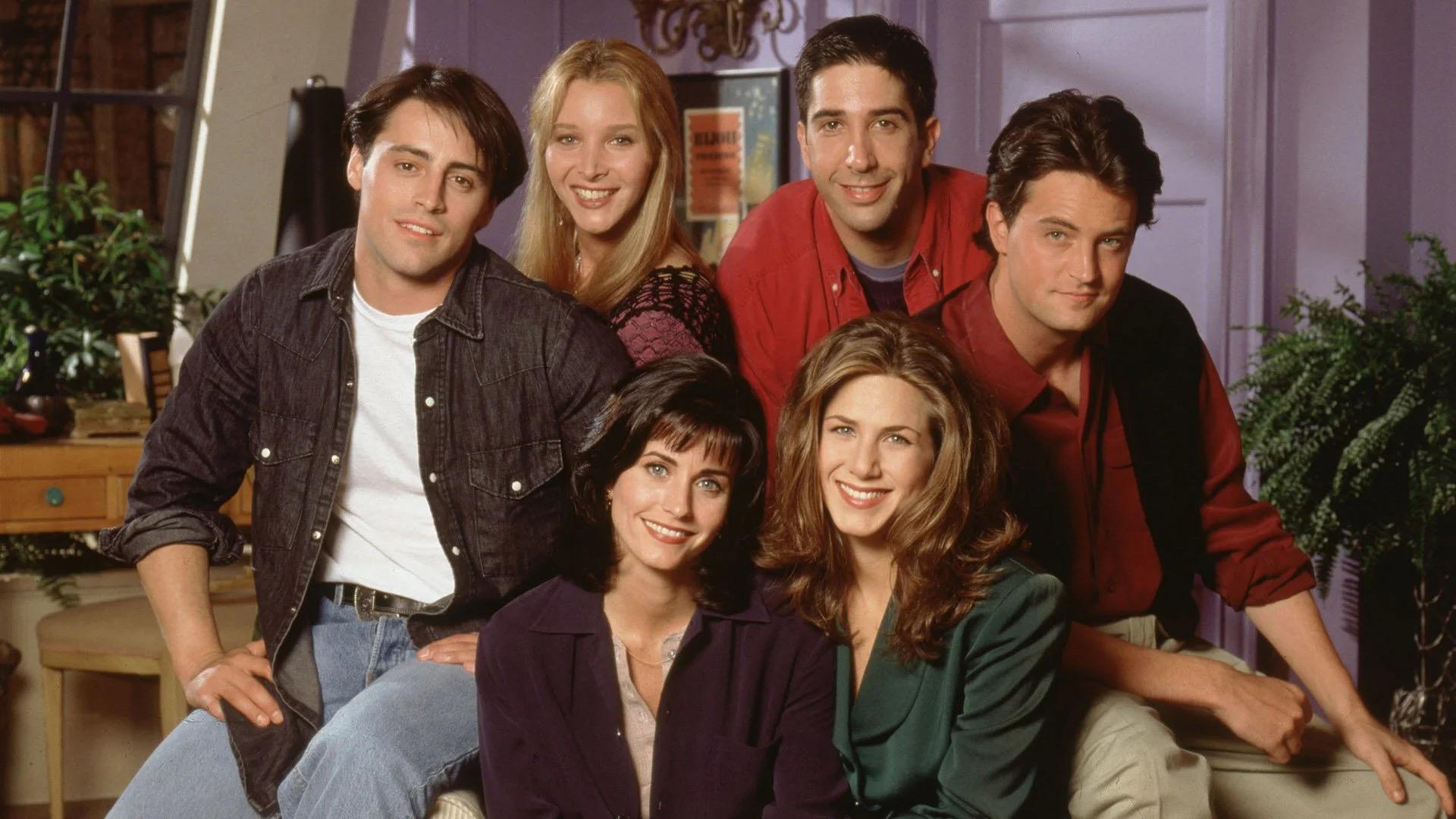
The demo image is shown as follows.
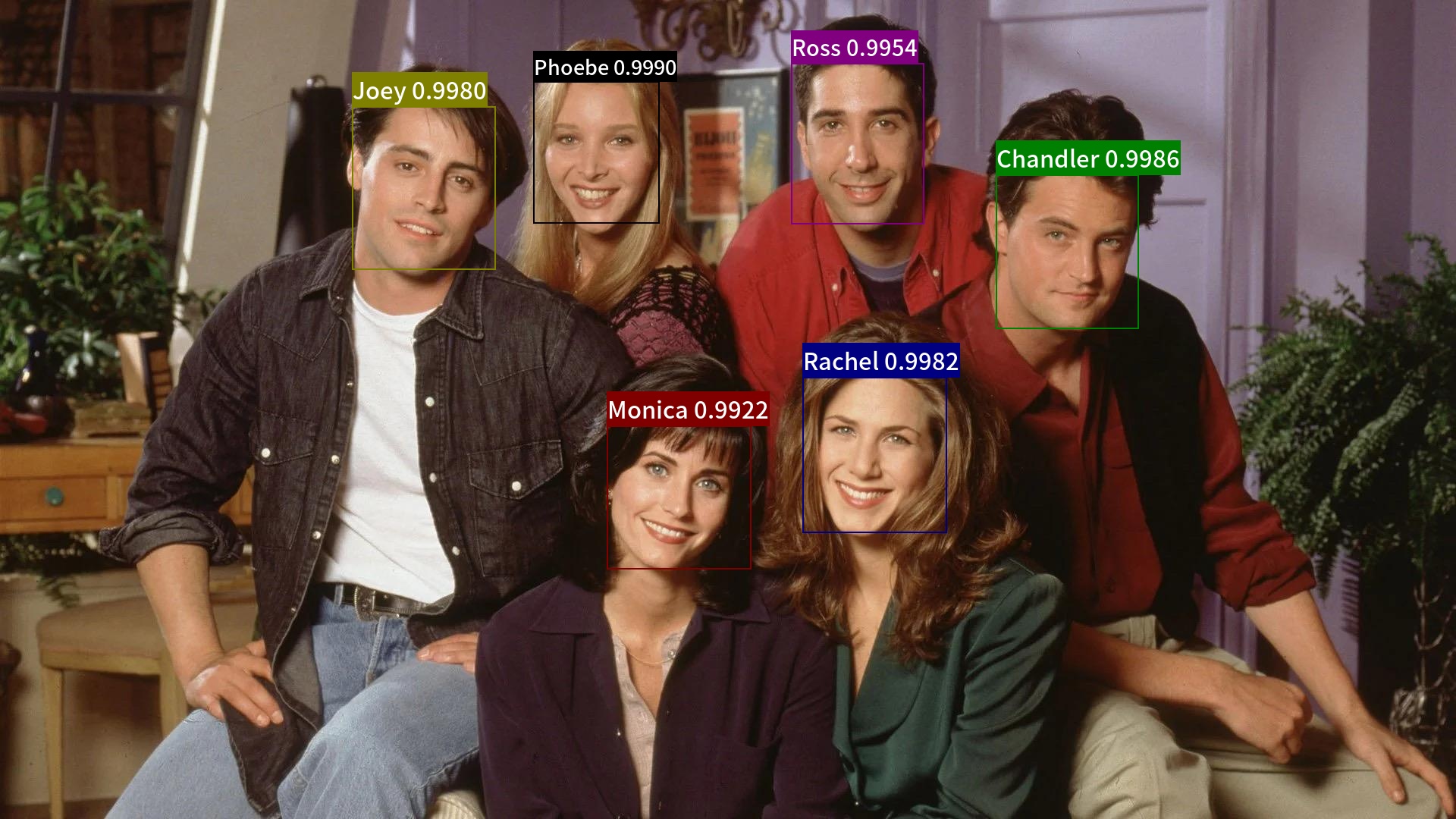
Use the following command to run the whole face recognition demo.
# detection + recogniotion process
python3.7 test_recognition.py --det --rec --index=index.bin --input=friends2.jpg --output="./output"
The final result is save in folder output/, which is shown as follows.
For more details about parameter explanations, index gallery construction and whl package inference, please refer to Whl package inference tutorial.