# Parsing
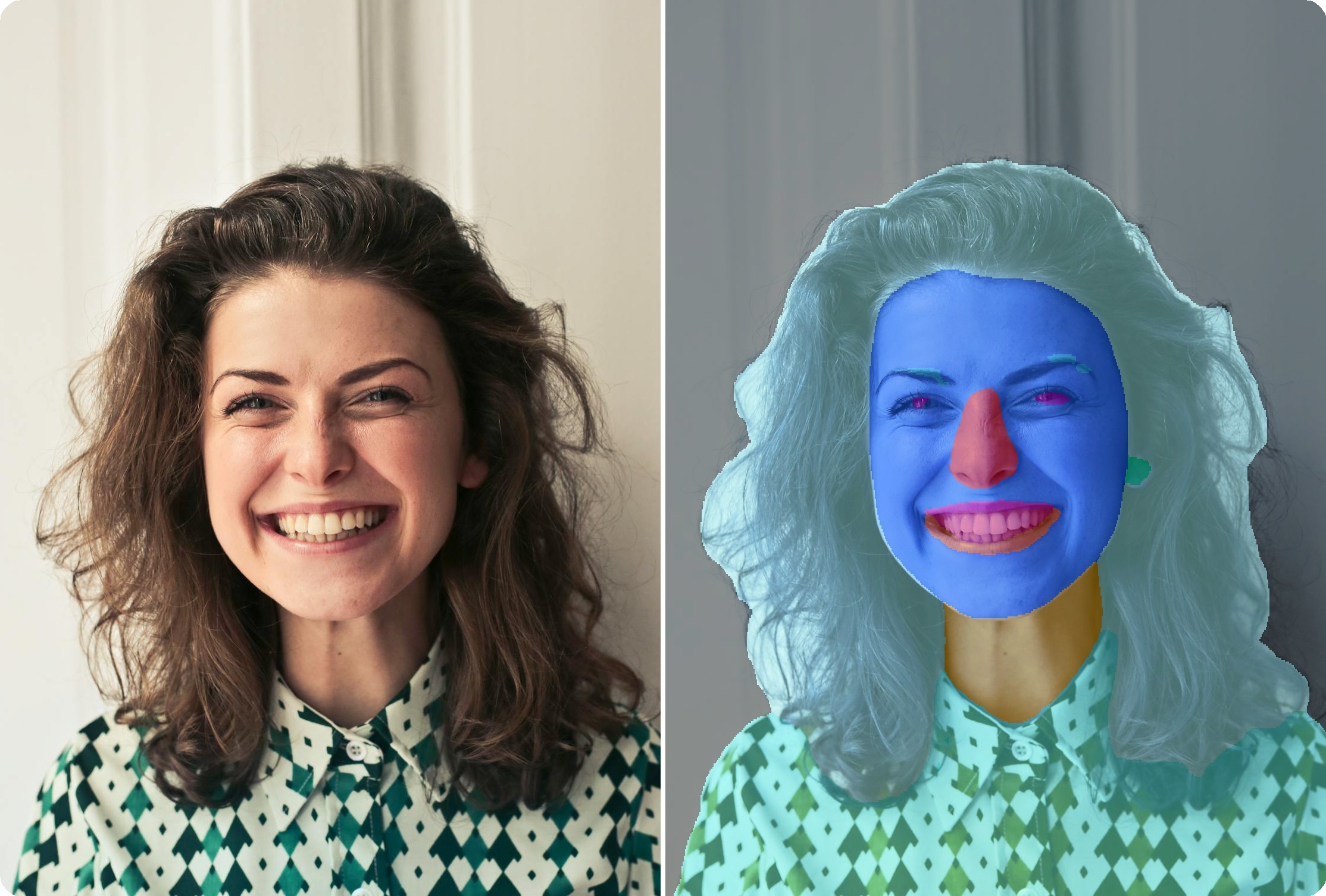
Face parsing segments faces into semantic components or face regions.
{ width="80%" }
BiSeNet face parsing with 19 semantic component classes
{ width="80%" }
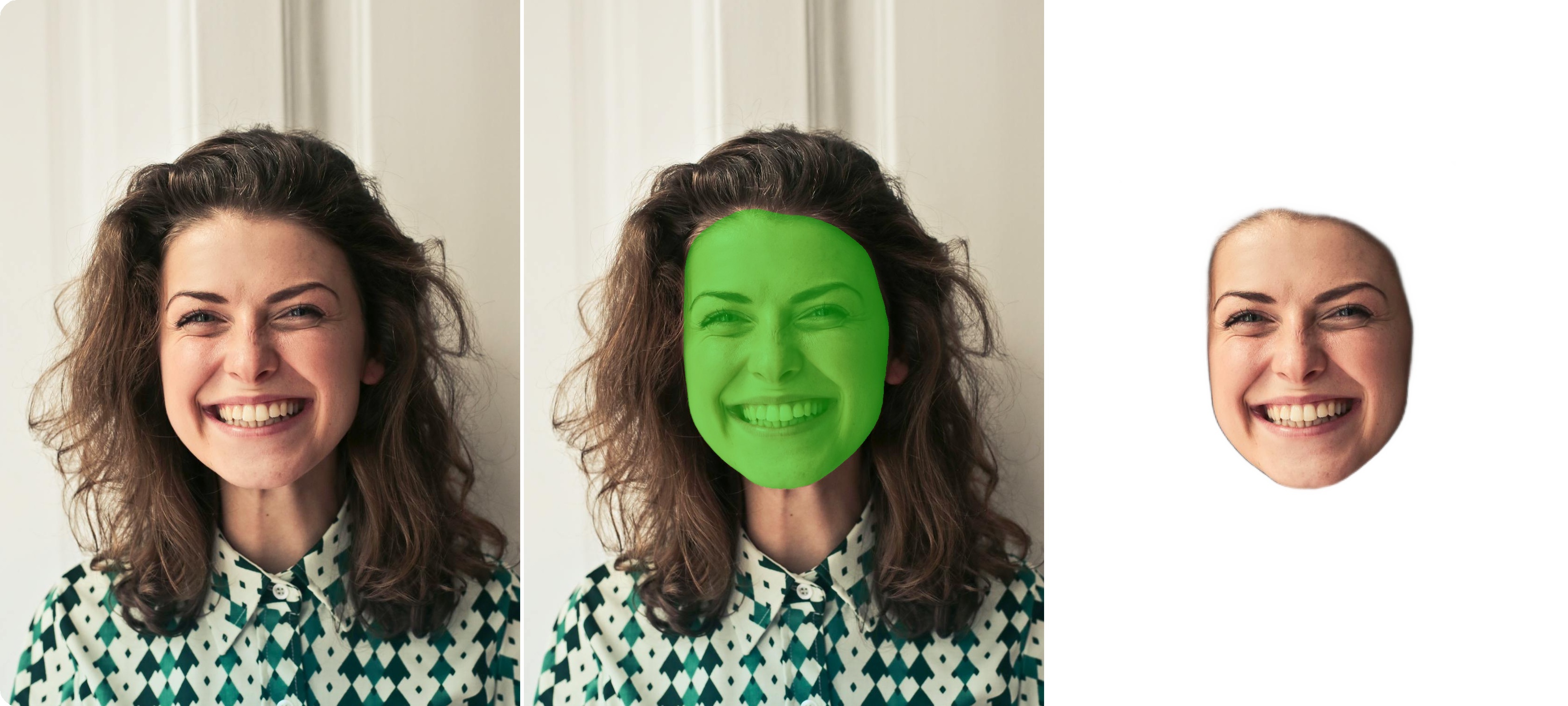
XSeg face region segmentation mask
---
## Available Models
| Model | Backbone | Size | Output |
|-------|----------|------|--------|
| **BiSeNet ResNet18** :material-check-circle: | ResNet18 | 51 MB | 19 classes |
| BiSeNet ResNet34 | ResNet34 | 89 MB | 19 classes |
| XSeg | - | 67 MB | Mask |
---
## Basic Usage
```python
import cv2
from uniface.parsing import BiSeNet
from uniface.draw import vis_parsing_maps
# Initialize parser
parser = BiSeNet()
# Load face image (cropped)
face_image = cv2.imread("face.jpg")
# Parse face
mask = parser.parse(face_image)
print(f"Mask shape: {mask.shape}") # (H, W)
# Visualize
face_rgb = cv2.cvtColor(face_image, cv2.COLOR_BGR2RGB)
vis_result = vis_parsing_maps(face_rgb, mask, save_image=False)
# Save result
vis_bgr = cv2.cvtColor(vis_result, cv2.COLOR_RGB2BGR)
cv2.imwrite("parsed.jpg", vis_bgr)
```
---
## 19 Facial Component Classes
| ID | Class | ID | Class |
|----|-------|----|-------|
| 0 | Background | 10 | Nose |
| 1 | Skin | 11 | Mouth |
| 2 | Left Eyebrow | 12 | Upper Lip |
| 3 | Right Eyebrow | 13 | Lower Lip |
| 4 | Left Eye | 14 | Neck |
| 5 | Right Eye | 15 | Necklace |
| 6 | Eyeglasses | 16 | Cloth |
| 7 | Left Ear | 17 | Hair |
| 8 | Right Ear | 18 | Hat |
| 9 | Earring | | |
---
## Model Variants
```python
from uniface.parsing import BiSeNet
from uniface.constants import ParsingWeights
# Default (ResNet18)
parser = BiSeNet()
# Higher accuracy (ResNet34)
parser = BiSeNet(model_name=ParsingWeights.RESNET34)
```
| Variant | Params | Size |
|---------|--------|------|
| **RESNET18** :material-check-circle: | 13.3M | 51 MB |
| RESNET34 | 24.1M | 89 MB |
---
## Full Pipeline
### With Face Detection
```python
import cv2
from uniface.detection import RetinaFace
from uniface.parsing import BiSeNet
from uniface.draw import vis_parsing_maps
detector = RetinaFace()
parser = BiSeNet()
image = cv2.imread("photo.jpg")
faces = detector.detect(image)
for i, face in enumerate(faces):
# Crop face
x1, y1, x2, y2 = map(int, face.bbox)
face_crop = image[y1:y2, x1:x2]
# Parse
mask = parser.parse(face_crop)
# Visualize
face_rgb = cv2.cvtColor(face_crop, cv2.COLOR_BGR2RGB)
vis_result = vis_parsing_maps(face_rgb, mask, save_image=False)
# Save
vis_bgr = cv2.cvtColor(vis_result, cv2.COLOR_RGB2BGR)
cv2.imwrite(f"face_{i}_parsed.jpg", vis_bgr)
```
---
## Extract Specific Components
### Get Single Component Mask
```python
import numpy as np
# Parse face
mask = parser.parse(face_image)
# Extract specific component
SKIN = 1
HAIR = 17
LEFT_EYE = 4
RIGHT_EYE = 5
# Binary mask for skin
skin_mask = (mask == SKIN).astype(np.uint8) * 255
# Binary mask for hair
hair_mask = (mask == HAIR).astype(np.uint8) * 255
# Binary mask for eyes
eyes_mask = ((mask == LEFT_EYE) | (mask == RIGHT_EYE)).astype(np.uint8) * 255
```
### Count Pixels per Component
```python
import numpy as np
mask = parser.parse(face_image)
component_names = {
0: 'Background', 1: 'Skin', 2: 'L-Eyebrow', 3: 'R-Eyebrow',
4: 'L-Eye', 5: 'R-Eye', 6: 'Eyeglasses', 7: 'L-Ear', 8: 'R-Ear',
9: 'Earring', 10: 'Nose', 11: 'Mouth',
12: 'U-Lip', 13: 'L-Lip', 14: 'Neck', 15: 'Necklace',
16: 'Cloth', 17: 'Hair', 18: 'Hat'
}
for class_id in np.unique(mask):
pixel_count = np.sum(mask == class_id)
name = component_names.get(class_id, f'Class {class_id}')
print(f"{name}: {pixel_count} pixels")
```
---
## Applications
### Face Makeup
Apply virtual makeup using component masks:
```python
import cv2
import numpy as np
def apply_lip_color(image, mask, color=(180, 50, 50)):
"""Apply lip color using parsing mask."""
result = image.copy()
# Get lip mask (upper lip=12, lower lip=13)
lip_mask = ((mask == 12) | (mask == 13)).astype(np.uint8)
# Create color overlay
overlay = np.zeros_like(image)
overlay[:] = color
# Alpha blend lip region
alpha = 0.4
mask_3ch = lip_mask[:, :, np.newaxis]
result = np.where(mask_3ch, (image * (1 - alpha) + overlay * alpha).astype(np.uint8), result)
return result
```
### Background Replacement
```python
def replace_background(image, mask, background):
"""Replace background using parsing mask."""
# Create foreground mask (everything except background)
foreground_mask = (mask != 0).astype(np.uint8)
# Resize background to match image
background = cv2.resize(background, (image.shape[1], image.shape[0]))
# Combine
result = image.copy()
result[foreground_mask == 0] = background[foreground_mask == 0]
return result
```
### Hair Segmentation
```python
def get_hair_mask(mask):
"""Extract clean hair mask."""
hair_mask = (mask == 17).astype(np.uint8) * 255
# Clean up with morphological operations
kernel = np.ones((5, 5), np.uint8)
hair_mask = cv2.morphologyEx(hair_mask, cv2.MORPH_CLOSE, kernel)
hair_mask = cv2.morphologyEx(hair_mask, cv2.MORPH_OPEN, kernel)
return hair_mask
```
---
## Visualization Options
```python
from uniface.draw import vis_parsing_maps
# Default visualization
vis_result = vis_parsing_maps(face_rgb, mask)
# With different parameters
vis_result = vis_parsing_maps(
face_rgb,
mask,
save_image=False, # Don't save to file
)
```
---
## XSeg
XSeg outputs a mask for face regions. Unlike BiSeNet which works on bbox crops, XSeg requires 5-point landmarks for face alignment.
### Basic Usage
```python
import cv2
from uniface.detection import RetinaFace
from uniface.parsing import XSeg
detector = RetinaFace()
parser = XSeg()
image = cv2.imread("photo.jpg")
faces = detector.detect(image)
for face in faces:
if face.landmarks is not None:
mask = parser.parse(image, landmarks=face.landmarks)
print(f"Mask shape: {mask.shape}") # (H, W), values in [0, 1]
```
### Parameters
```python
from uniface.parsing import XSeg
# Default settings
parser = XSeg()
# Custom settings
parser = XSeg(
align_size=256, # Face alignment size
blur_sigma=5, # Gaussian blur for smoothing (0 = raw)
)
```
| Parameter | Default | Description |
|-----------|---------|-------------|
| `align_size` | 256 | Face alignment output size |
| `blur_sigma` | 0 | Mask smoothing (0 = no blur) |
### Methods
```python
# Full pipeline: align -> segment -> warp back to original space
mask = parser.parse(image, landmarks=landmarks)
# For pre-aligned face crops
mask = parser.parse_aligned(face_crop)
# Get mask + crop + inverse matrix for custom warping
mask, face_crop, inverse_matrix = parser.parse_with_inverse(image, landmarks)
```
### BiSeNet vs XSeg
| Feature | BiSeNet | XSeg |
|---------|---------|------|
| Output | 19 class labels | Mask [0, 1] |
| Input | Bbox crop | Requires landmarks |
| Use case | Facial components | Face region extraction |
---
## Factory Function
```python
from uniface.parsing import create_face_parser
from uniface.constants import ParsingWeights, XSegWeights
# BiSeNet (default)
parser = create_face_parser()
# XSeg
parser = create_face_parser(XSegWeights.DEFAULT)
```
---
## Next Steps
- [Gaze](gaze.md) - Gaze estimation
- [Privacy](privacy.md) - Face anonymization
- [Detection](detection.md) - Face detection