mirror of
https://github.com/yakhyo/uniface.git
synced 2026-05-17 14:23:46 +00:00

310 lines
7.5 KiB
Markdown
310 lines
7.5 KiB
Markdown
# Landmarks
|
||
|
||
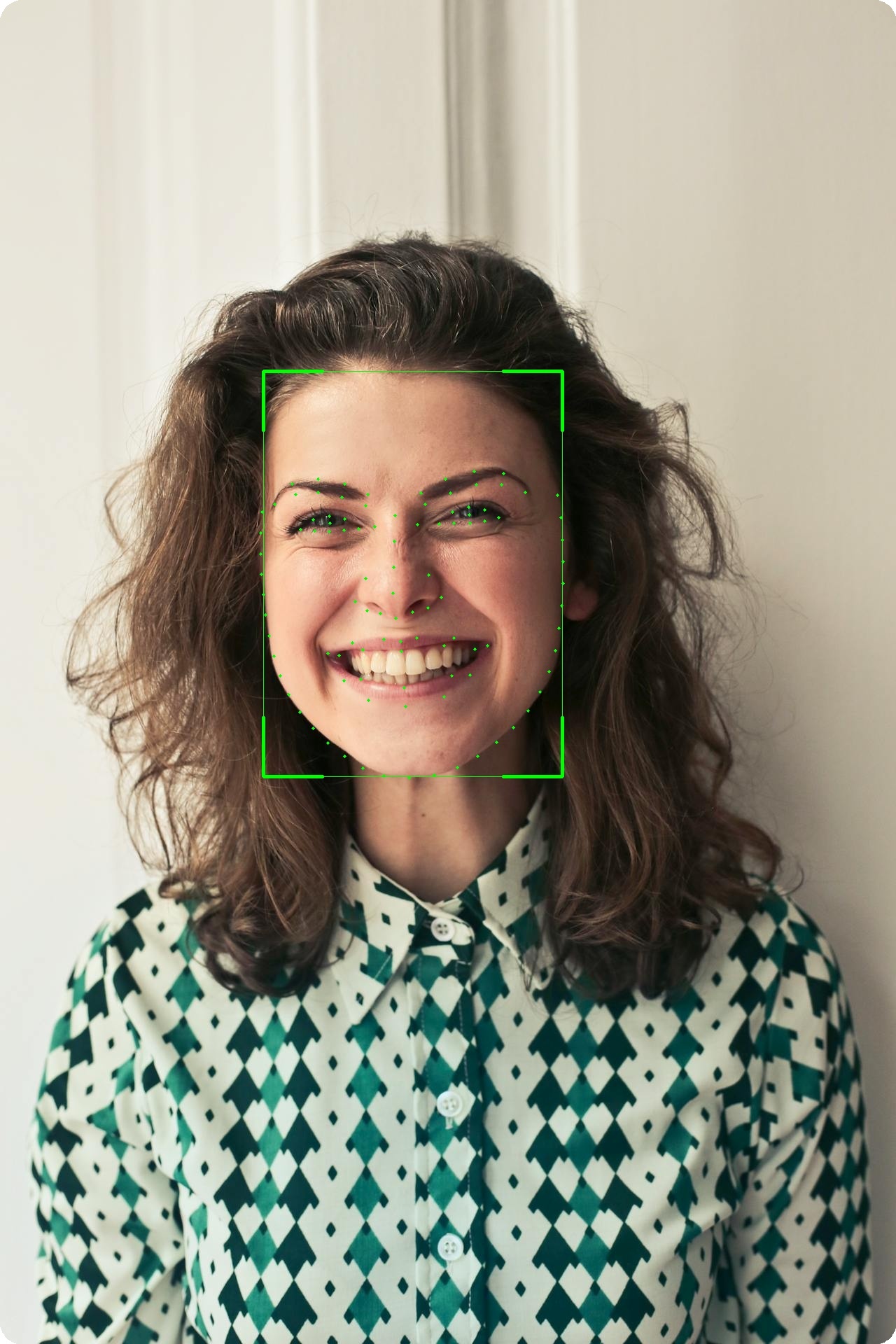
Facial landmark detection provides precise localization of facial features.
|
||
|
||
<figure markdown="span">
|
||
{ width="50%" }
|
||
<figcaption>106-point facial landmark localization</figcaption>
|
||
</figure>
|
||
|
||
---
|
||
|
||
## Available Models
|
||
|
||
| Model | Points | Size |
|
||
|-------|--------|------|
|
||
| **Landmark106** | 106 | 14 MB |
|
||
| **PIPNet (WFLW-98)** | 98 | 47 MB |
|
||
| **PIPNet (300W+CelebA-68)** | 68 | 46 MB |
|
||
|
||
!!! info "5-Point Landmarks"
|
||
Basic 5-point landmarks are included with all detection models (RetinaFace, SCRFD, YOLOv5-Face, YOLOv8-Face).
|
||
|
||
---
|
||
|
||
## 106-Point Landmarks
|
||
|
||
### Basic Usage
|
||
|
||
```python
|
||
from uniface.detection import RetinaFace
|
||
from uniface.landmark import Landmark106
|
||
|
||
detector = RetinaFace()
|
||
landmarker = Landmark106()
|
||
|
||
# Detect face
|
||
faces = detector.detect(image)
|
||
|
||
# Get detailed landmarks
|
||
if faces:
|
||
landmarks = landmarker.get_landmarks(image, faces[0].bbox)
|
||
print(f"Landmarks shape: {landmarks.shape}") # (106, 2)
|
||
```
|
||
|
||
### Landmark Groups
|
||
|
||
| Range | Group | Points |
|
||
|-------|-------|--------|
|
||
| 0-32 | Face Contour | 33 |
|
||
| 33-50 | Eyebrows | 18 |
|
||
| 51-62 | Nose | 12 |
|
||
| 63-86 | Eyes | 24 |
|
||
| 87-105 | Mouth | 19 |
|
||
|
||
### Extract Specific Features
|
||
|
||
```python
|
||
landmarks = landmarker.get_landmarks(image, face.bbox)
|
||
|
||
# Face contour
|
||
contour = landmarks[0:33]
|
||
|
||
# Left eyebrow
|
||
left_eyebrow = landmarks[33:42]
|
||
|
||
# Right eyebrow
|
||
right_eyebrow = landmarks[42:51]
|
||
|
||
# Nose
|
||
nose = landmarks[51:63]
|
||
|
||
# Left eye
|
||
left_eye = landmarks[63:72]
|
||
|
||
# Right eye
|
||
right_eye = landmarks[76:84]
|
||
|
||
# Mouth
|
||
mouth = landmarks[87:106]
|
||
```
|
||
|
||
---
|
||
|
||
## PIPNet (98 / 68 points)
|
||
|
||
PIPNet (Pixel-in-Pixel Net) is a high-accuracy facial landmark detector. UniFace ships
|
||
two ONNX variants that share a ResNet-18 backbone and 256×256 input — the only difference
|
||
is the number of points and the dataset they were trained on.
|
||
|
||
### Basic Usage
|
||
|
||
```python
|
||
from uniface.detection import RetinaFace
|
||
from uniface.landmark import PIPNet
|
||
|
||
detector = RetinaFace()
|
||
landmarker = PIPNet() # Default: 98 points (WFLW)
|
||
|
||
faces = detector.detect(image)
|
||
if faces:
|
||
landmarks = landmarker.get_landmarks(image, faces[0].bbox)
|
||
print(f"Landmarks shape: {landmarks.shape}") # (98, 2)
|
||
```
|
||
|
||
### 68-Point Variant (300W+CelebA, GSSL)
|
||
|
||
```python
|
||
from uniface.constants import PIPNetWeights
|
||
from uniface.landmark import PIPNet
|
||
|
||
landmarker = PIPNet(model_name=PIPNetWeights.DW300_CELEBA_68)
|
||
landmarks = landmarker.get_landmarks(image, face.bbox)
|
||
print(landmarks.shape) # (68, 2)
|
||
```
|
||
|
||
### Notes
|
||
|
||
- The number of landmarks is read from the ONNX output and the matching meanface
|
||
table is selected automatically — there is no `num_lms=` argument.
|
||
- PIPNet uses an asymmetric crop around the bbox (+10% left / right / bottom,
|
||
−10% top) and ImageNet normalization. This is handled internally.
|
||
- Output landmarks are in original-image pixel coordinates as `float32`.
|
||
|
||
---
|
||
|
||
## 5-Point Landmarks (Detection)
|
||
|
||
All detection models provide 5-point landmarks:
|
||
|
||
```python
|
||
from uniface.detection import RetinaFace
|
||
|
||
detector = RetinaFace()
|
||
faces = detector.detect(image)
|
||
|
||
if faces:
|
||
landmarks_5 = faces[0].landmarks
|
||
print(f"Shape: {landmarks_5.shape}") # (5, 2)
|
||
|
||
left_eye = landmarks_5[0]
|
||
right_eye = landmarks_5[1]
|
||
nose = landmarks_5[2]
|
||
left_mouth = landmarks_5[3]
|
||
right_mouth = landmarks_5[4]
|
||
```
|
||
|
||
---
|
||
|
||
## Visualization
|
||
|
||
### Draw 106 Landmarks
|
||
|
||
```python
|
||
import cv2
|
||
|
||
def draw_landmarks(image, landmarks, color=(0, 255, 0), radius=2):
|
||
"""Draw landmarks on image."""
|
||
for x, y in landmarks.astype(int):
|
||
cv2.circle(image, (x, y), radius, color, -1)
|
||
return image
|
||
|
||
# Usage
|
||
landmarks = landmarker.get_landmarks(image, face.bbox)
|
||
image_with_landmarks = draw_landmarks(image.copy(), landmarks)
|
||
cv2.imwrite("landmarks.jpg", image_with_landmarks)
|
||
```
|
||
|
||
### Draw with Connections
|
||
|
||
```python
|
||
def draw_landmarks_with_connections(image, landmarks):
|
||
"""Draw landmarks with facial feature connections."""
|
||
landmarks = landmarks.astype(int)
|
||
|
||
# Face contour (0-32)
|
||
for i in range(32):
|
||
cv2.line(image, tuple(landmarks[i]), tuple(landmarks[i+1]), (255, 255, 0), 1)
|
||
|
||
# Left eyebrow (33-41)
|
||
for i in range(33, 41):
|
||
cv2.line(image, tuple(landmarks[i]), tuple(landmarks[i+1]), (0, 255, 0), 1)
|
||
|
||
# Right eyebrow (42-50)
|
||
for i in range(42, 50):
|
||
cv2.line(image, tuple(landmarks[i]), tuple(landmarks[i+1]), (0, 255, 0), 1)
|
||
|
||
# Nose (51-62)
|
||
for i in range(51, 62):
|
||
cv2.line(image, tuple(landmarks[i]), tuple(landmarks[i+1]), (0, 0, 255), 1)
|
||
|
||
# Draw points
|
||
for x, y in landmarks:
|
||
cv2.circle(image, (x, y), 2, (0, 255, 255), -1)
|
||
|
||
return image
|
||
```
|
||
|
||
---
|
||
|
||
## Use Cases
|
||
|
||
### Face Alignment
|
||
|
||
```python
|
||
from uniface.face_utils import face_alignment
|
||
|
||
# Align face using 5-point landmarks
|
||
aligned = face_alignment(image, faces[0].landmarks)
|
||
# Returns: 112x112 aligned face
|
||
```
|
||
|
||
### Eye Aspect Ratio (Blink Detection)
|
||
|
||
```python
|
||
import numpy as np
|
||
|
||
def eye_aspect_ratio(eye_landmarks):
|
||
"""Calculate eye aspect ratio for blink detection."""
|
||
# Vertical distances
|
||
v1 = np.linalg.norm(eye_landmarks[1] - eye_landmarks[5])
|
||
v2 = np.linalg.norm(eye_landmarks[2] - eye_landmarks[4])
|
||
|
||
# Horizontal distance
|
||
h = np.linalg.norm(eye_landmarks[0] - eye_landmarks[3])
|
||
|
||
ear = (v1 + v2) / (2.0 * h)
|
||
return ear
|
||
|
||
# Usage with 106-point landmarks
|
||
left_eye = landmarks[63:72] # Approximate eye points
|
||
ear = eye_aspect_ratio(left_eye)
|
||
|
||
if ear < 0.2:
|
||
print("Eye closed (blink detected)")
|
||
```
|
||
|
||
### Head Pose Estimation
|
||
|
||
```python
|
||
import cv2
|
||
import numpy as np
|
||
|
||
def estimate_head_pose(landmarks, image_shape):
|
||
"""Estimate head pose from facial landmarks."""
|
||
# 3D model points (generic face model)
|
||
model_points = np.array([
|
||
(0.0, 0.0, 0.0), # Nose tip
|
||
(0.0, -330.0, -65.0), # Chin
|
||
(-225.0, 170.0, -135.0), # Left eye corner
|
||
(225.0, 170.0, -135.0), # Right eye corner
|
||
(-150.0, -150.0, -125.0), # Left mouth corner
|
||
(150.0, -150.0, -125.0) # Right mouth corner
|
||
], dtype=np.float64)
|
||
|
||
# 2D image points (from 106 landmarks)
|
||
image_points = np.array([
|
||
landmarks[51], # Nose tip
|
||
landmarks[16], # Chin
|
||
landmarks[63], # Left eye corner
|
||
landmarks[76], # Right eye corner
|
||
landmarks[87], # Left mouth corner
|
||
landmarks[93] # Right mouth corner
|
||
], dtype=np.float64)
|
||
|
||
# Camera matrix
|
||
h, w = image_shape[:2]
|
||
focal_length = w
|
||
center = (w / 2, h / 2)
|
||
camera_matrix = np.array([
|
||
[focal_length, 0, center[0]],
|
||
[0, focal_length, center[1]],
|
||
[0, 0, 1]
|
||
], dtype=np.float64)
|
||
|
||
# Solve PnP
|
||
dist_coeffs = np.zeros((4, 1))
|
||
success, rotation_vector, translation_vector = cv2.solvePnP(
|
||
model_points, image_points, camera_matrix, dist_coeffs
|
||
)
|
||
|
||
return rotation_vector, translation_vector
|
||
```
|
||
|
||
---
|
||
|
||
## Factory Function
|
||
|
||
```python
|
||
from uniface.constants import PIPNetWeights
|
||
from uniface.landmark import create_landmarker
|
||
|
||
# Default: 106-point InsightFace model
|
||
landmarker = create_landmarker()
|
||
|
||
# 98-point PIPNet (WFLW)
|
||
landmarker = create_landmarker('pipnet')
|
||
|
||
# 68-point PIPNet (300W+CelebA)
|
||
landmarker = create_landmarker('pipnet', model_name=PIPNetWeights.DW300_CELEBA_68)
|
||
```
|
||
|
||
---
|
||
|
||
## See Also
|
||
|
||
- [Detection Module](detection.md) - Face detection with 5-point landmarks
|
||
- [Attributes Module](attributes.md) - Age, gender, emotion
|
||
- [Gaze Module](gaze.md) - Gaze estimation
|
||
- [Concepts: Coordinate Systems](../concepts/coordinate-systems.md) - Landmark formats
|