mirror of
https://github.com/yakhyo/uniface.git
synced 2026-05-15 04:37:49 +00:00
 9bf54f5f78
* refactor: Split recognition models into separate files

* feat: Add EdgeFace recognition model

* release: Bump version to v3.4.0
367 lines
9.4 KiB
Markdown
367 lines
9.4 KiB
Markdown
# Recognition
|
|
|
|
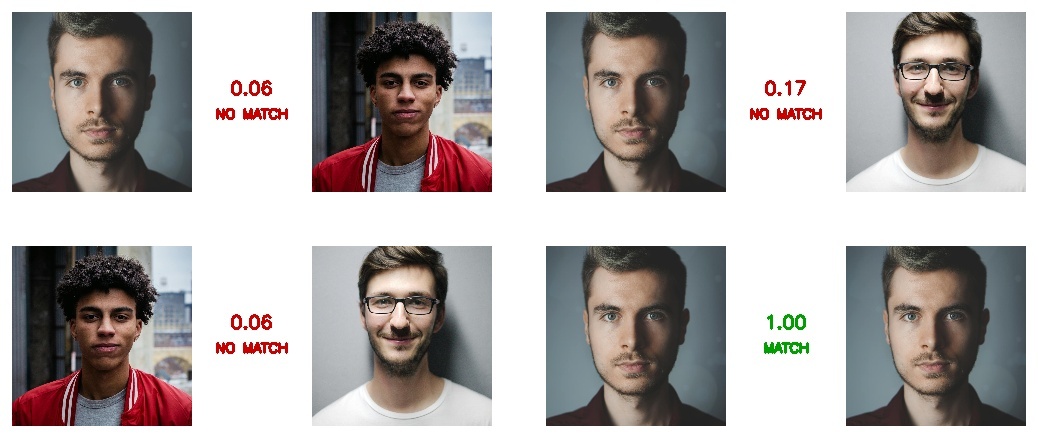
Face recognition extracts embeddings for identity verification and face search.
|
|
|
|
<figure markdown="span">
|
|
{ width="80%" }
|
|
<figcaption>Pairwise face verification with cosine similarity scores</figcaption>
|
|
</figure>
|
|
|
|
---
|
|
|
|
## Available Models
|
|
|
|
| Model | Backbone | Size | Embedding Dim |
|
|
|-------|----------|------|---------------|
|
|
| **AdaFace** | IR-18/IR-101 | 92-249 MB | 512 |
|
|
| **ArcFace** | MobileNet/ResNet | 8-166 MB | 512 |
|
|
| **EdgeFace** | EdgeNeXt/LoRA | 5-70 MB | 512 |
|
|
| **MobileFace** | MobileNet V2/V3 | 1-10 MB | 512 |
|
|
| **SphereFace** | Sphere20/36 | 50-92 MB | 512 |
|
|
|
|
---
|
|
|
|
## AdaFace
|
|
|
|
Face recognition using adaptive margin based on image quality.
|
|
|
|
### Basic Usage
|
|
|
|
```python
|
|
from uniface.detection import RetinaFace
|
|
from uniface.recognition import AdaFace
|
|
|
|
detector = RetinaFace()
|
|
recognizer = AdaFace()
|
|
|
|
# Detect face
|
|
faces = detector.detect(image)
|
|
|
|
# Extract embedding
|
|
if faces:
|
|
embedding = recognizer.get_normalized_embedding(image, faces[0].landmarks)
|
|
print(f"Embedding shape: {embedding.shape}") # (1, 512)
|
|
```
|
|
|
|
### Model Variants
|
|
|
|
```python
|
|
from uniface.recognition import AdaFace
|
|
from uniface.constants import AdaFaceWeights
|
|
|
|
# Lightweight (default)
|
|
recognizer = AdaFace(model_name=AdaFaceWeights.IR_18)
|
|
|
|
# High accuracy
|
|
recognizer = AdaFace(model_name=AdaFaceWeights.IR_101)
|
|
|
|
# Force CPU execution
|
|
recognizer = AdaFace(providers=['CPUExecutionProvider'])
|
|
```
|
|
|
|
| Variant | Dataset | Size | IJB-B | IJB-C |
|
|
|---------|---------|------|-------|-------|
|
|
| **IR_18** :material-check-circle: | WebFace4M | 92 MB | 93.03% | 94.99% |
|
|
| IR_101 | WebFace12M | 249 MB | - | 97.66% |
|
|
|
|
!!! info "Benchmark Metrics"
|
|
IJB-B and IJB-C accuracy reported as TAR@FAR=0.01%
|
|
|
|
---
|
|
|
|
## ArcFace
|
|
|
|
Face recognition using additive angular margin loss.
|
|
|
|
### Basic Usage
|
|
|
|
```python
|
|
from uniface.detection import RetinaFace
|
|
from uniface.recognition import ArcFace
|
|
|
|
detector = RetinaFace()
|
|
recognizer = ArcFace()
|
|
|
|
# Detect face
|
|
faces = detector.detect(image)
|
|
|
|
# Extract embedding
|
|
if faces:
|
|
embedding = recognizer.get_normalized_embedding(image, faces[0].landmarks)
|
|
print(f"Embedding shape: {embedding.shape}") # (1, 512)
|
|
```
|
|
|
|
### Model Variants
|
|
|
|
```python
|
|
from uniface.recognition import ArcFace
|
|
from uniface.constants import ArcFaceWeights
|
|
|
|
# Lightweight (default)
|
|
recognizer = ArcFace(model_name=ArcFaceWeights.MNET)
|
|
|
|
# High accuracy
|
|
recognizer = ArcFace(model_name=ArcFaceWeights.RESNET)
|
|
|
|
# Force CPU execution
|
|
recognizer = ArcFace(providers=['CPUExecutionProvider'])
|
|
```
|
|
|
|
| Variant | Backbone | Size | LFW | CFP-FP | AgeDB-30 | IJB-C |
|
|
|---------|----------|------|-----|--------|----------|-------|
|
|
| **MNET** :material-check-circle: | MobileNet | 8 MB | 99.70% | 98.00% | 96.58% | 95.02% |
|
|
| RESNET | ResNet50 | 166 MB | 99.83% | 99.33% | 98.23% | 97.25% |
|
|
|
|
!!! info "Training Data & Metrics"
|
|
**Dataset**: Trained on WebFace600K (600K images)
|
|
|
|
**Accuracy**: IJB-C reported as TAR@FAR=1e-4
|
|
|
|
---
|
|
|
|
## EdgeFace
|
|
|
|
Efficient face recognition designed for edge devices, using an EdgeNeXt backbone with optional LoRA low-rank compression. Competition-winning entry (compact track) at EFaR 2023, IJCB.
|
|
|
|
### Basic Usage
|
|
|
|
```python
|
|
from uniface.detection import RetinaFace
|
|
from uniface.recognition import EdgeFace
|
|
|
|
detector = RetinaFace()
|
|
recognizer = EdgeFace()
|
|
|
|
# Detect face
|
|
faces = detector.detect(image)
|
|
|
|
# Extract embedding
|
|
if faces:
|
|
embedding = recognizer.get_normalized_embedding(image, faces[0].landmarks)
|
|
print(f"Embedding shape: {embedding.shape}") # (512,)
|
|
```
|
|
|
|
### Model Variants
|
|
|
|
```python
|
|
from uniface.recognition import EdgeFace
|
|
from uniface.constants import EdgeFaceWeights
|
|
|
|
# Ultra-compact (default)
|
|
recognizer = EdgeFace(model_name=EdgeFaceWeights.XXS)
|
|
|
|
# Compact with LoRA
|
|
recognizer = EdgeFace(model_name=EdgeFaceWeights.XS_GAMMA_06)
|
|
|
|
# Small with LoRA
|
|
recognizer = EdgeFace(model_name=EdgeFaceWeights.S_GAMMA_05)
|
|
|
|
# Full-size
|
|
recognizer = EdgeFace(model_name=EdgeFaceWeights.BASE)
|
|
|
|
# Force CPU execution
|
|
recognizer = EdgeFace(providers=['CPUExecutionProvider'])
|
|
```
|
|
|
|
| Variant | Params | MFLOPs | Size | LFW | CALFW | CPLFW | CFP-FP | AgeDB-30 |
|
|
|---------|--------|--------|------|-----|-------|-------|--------|----------|
|
|
| **XXS** :material-check-circle: | 1.24M | 94 | ~5 MB | 99.57% | 94.83% | 90.27% | 93.63% | 94.92% |
|
|
| XS_GAMMA_06 | 1.77M | 154 | ~7 MB | 99.73% | 95.28% | 91.58% | 94.71% | 96.08% |
|
|
| S_GAMMA_05 | 3.65M | 306 | ~14 MB | 99.78% | 95.55% | 92.48% | 95.74% | 97.03% |
|
|
| BASE | 18.2M | 1399 | ~70 MB | 99.83% | 96.07% | 93.75% | 97.01% | 97.60% |
|
|
|
|
!!! info "Reference"
|
|
**Paper**: [EdgeFace: Efficient Face Recognition Model for Edge Devices](https://arxiv.org/abs/2307.01838v2) (IEEE T-BIOM 2024)
|
|
|
|
**Source**: [github.com/otroshi/edgeface](https://github.com/otroshi/edgeface)
|
|
|
|
---
|
|
|
|
## MobileFace
|
|
|
|
Lightweight face recognition models with MobileNet backbones.
|
|
|
|
### Basic Usage
|
|
|
|
```python
|
|
from uniface.recognition import MobileFace
|
|
|
|
recognizer = MobileFace()
|
|
embedding = recognizer.get_normalized_embedding(image, landmarks)
|
|
```
|
|
|
|
### Model Variants
|
|
|
|
```python
|
|
from uniface.recognition import MobileFace
|
|
from uniface.constants import MobileFaceWeights
|
|
|
|
# Ultra-lightweight
|
|
recognizer = MobileFace(model_name=MobileFaceWeights.MNET_025)
|
|
|
|
# Balanced (default)
|
|
recognizer = MobileFace(model_name=MobileFaceWeights.MNET_V2)
|
|
|
|
# Higher accuracy
|
|
recognizer = MobileFace(model_name=MobileFaceWeights.MNET_V3_LARGE)
|
|
```
|
|
|
|
| Variant | Params | Size | LFW | CALFW | CPLFW | AgeDB-30 |
|
|
|---------|--------|------|-----|-------|-------|----------|
|
|
| MNET_025 | 0.36M | 1 MB | 98.76% | 92.02% | 82.37% | 90.02% |
|
|
| **MNET_V2** :material-check-circle: | 2.29M | 4 MB | 99.55% | 94.87% | 86.89% | 95.16% |
|
|
| MNET_V3_SMALL | 1.25M | 3 MB | 99.30% | 93.77% | 85.29% | 92.79% |
|
|
| MNET_V3_LARGE | 3.52M | 10 MB | 99.53% | 94.56% | 86.79% | 95.13% |
|
|
|
|
---
|
|
|
|
## SphereFace
|
|
|
|
Face recognition using angular softmax loss (A-Softmax).
|
|
|
|
### Basic Usage
|
|
|
|
```python
|
|
from uniface.recognition import SphereFace
|
|
from uniface.constants import SphereFaceWeights
|
|
|
|
recognizer = SphereFace(model_name=SphereFaceWeights.SPHERE20)
|
|
embedding = recognizer.get_normalized_embedding(image, landmarks)
|
|
```
|
|
|
|
| Variant | Params | Size | LFW | CALFW | CPLFW | AgeDB-30 |
|
|
|---------|--------|------|-----|-------|-------|----------|
|
|
| SPHERE20 | 24.5M | 50 MB | 99.67% | 95.61% | 88.75% | 96.58% |
|
|
| SPHERE36 | 34.6M | 92 MB | 99.72% | 95.64% | 89.92% | 96.83% |
|
|
|
|
---
|
|
|
|
## Face Comparison
|
|
|
|
### Compute Similarity
|
|
|
|
```python
|
|
from uniface.face_utils import compute_similarity
|
|
import numpy as np
|
|
|
|
# Extract embeddings
|
|
emb1 = recognizer.get_normalized_embedding(image1, landmarks1)
|
|
emb2 = recognizer.get_normalized_embedding(image2, landmarks2)
|
|
|
|
# Method 1: Using utility function
|
|
similarity = compute_similarity(emb1, emb2)
|
|
|
|
# Method 2: Direct computation
|
|
similarity = np.dot(emb1, emb2.T)[0][0]
|
|
|
|
print(f"Similarity: {similarity:.4f}")
|
|
```
|
|
|
|
### Threshold Guidelines
|
|
|
|
| Threshold | Decision | Use Case |
|
|
|-----------|----------|----------|
|
|
| > 0.7 | Very high confidence | Security-critical |
|
|
| > 0.6 | Same person | General verification |
|
|
| 0.4 - 0.6 | Uncertain | Manual review needed |
|
|
| < 0.4 | Different people | Rejection |
|
|
|
|
---
|
|
|
|
## Face Alignment
|
|
|
|
Recognition models require aligned faces. UniFace handles this internally:
|
|
|
|
```python
|
|
# Alignment is done automatically
|
|
embedding = recognizer.get_normalized_embedding(image, landmarks)
|
|
|
|
# Or manually align
|
|
from uniface.face_utils import face_alignment
|
|
|
|
aligned_face = face_alignment(image, landmarks)
|
|
# Returns: 112x112 aligned face image
|
|
```
|
|
|
|
---
|
|
|
|
## Building a Face Database
|
|
|
|
```python
|
|
import numpy as np
|
|
from uniface.detection import RetinaFace
|
|
from uniface.recognition import ArcFace
|
|
|
|
detector = RetinaFace()
|
|
recognizer = ArcFace()
|
|
|
|
# Build database
|
|
database = {}
|
|
for person_id, image_path in person_images.items():
|
|
image = cv2.imread(image_path)
|
|
faces = detector.detect(image)
|
|
|
|
if faces:
|
|
embedding = recognizer.get_normalized_embedding(image, faces[0].landmarks)
|
|
database[person_id] = embedding
|
|
|
|
# Save for later use
|
|
np.savez('face_database.npz', **database)
|
|
|
|
# Load database
|
|
data = np.load('face_database.npz')
|
|
database = {key: data[key] for key in data.files}
|
|
```
|
|
|
|
---
|
|
|
|
## Face Search
|
|
|
|
Find a person in a database:
|
|
|
|
```python
|
|
def search_face(query_embedding, database, threshold=0.6):
|
|
"""Find best match in database."""
|
|
best_match = None
|
|
best_similarity = -1
|
|
|
|
for person_id, db_embedding in database.items():
|
|
similarity = np.dot(query_embedding, db_embedding.T)[0][0]
|
|
|
|
if similarity > best_similarity and similarity > threshold:
|
|
best_similarity = similarity
|
|
best_match = person_id
|
|
|
|
return best_match, best_similarity
|
|
|
|
# Usage
|
|
query_embedding = recognizer.get_normalized_embedding(query_image, landmarks)
|
|
match, similarity = search_face(query_embedding, database)
|
|
|
|
if match:
|
|
print(f"Found: {match} (similarity: {similarity:.4f})")
|
|
else:
|
|
print("No match found")
|
|
```
|
|
|
|
---
|
|
|
|
## Factory Function
|
|
|
|
```python
|
|
from uniface.recognition import create_recognizer
|
|
|
|
# Available methods: 'arcface', 'adaface', 'edgeface', 'mobileface', 'sphereface'
|
|
recognizer = create_recognizer('arcface')
|
|
recognizer = create_recognizer('adaface')
|
|
recognizer = create_recognizer('edgeface')
|
|
```
|
|
|
|
---
|
|
|
|
## See Also
|
|
|
|
- [Detection Module](detection.md) - Detect faces first
|
|
- [Face Search Recipe](../recipes/face-search.md) - Complete search system
|
|
- [Thresholds](../concepts/thresholds-calibration.md) - Calibration guide
|