mirror of
https://github.com/yakhyo/uniface.git
synced 2026-05-15 12:57:55 +00:00

266 lines
5.8 KiB
Markdown
266 lines
5.8 KiB
Markdown
# Privacy
|
|
|
|
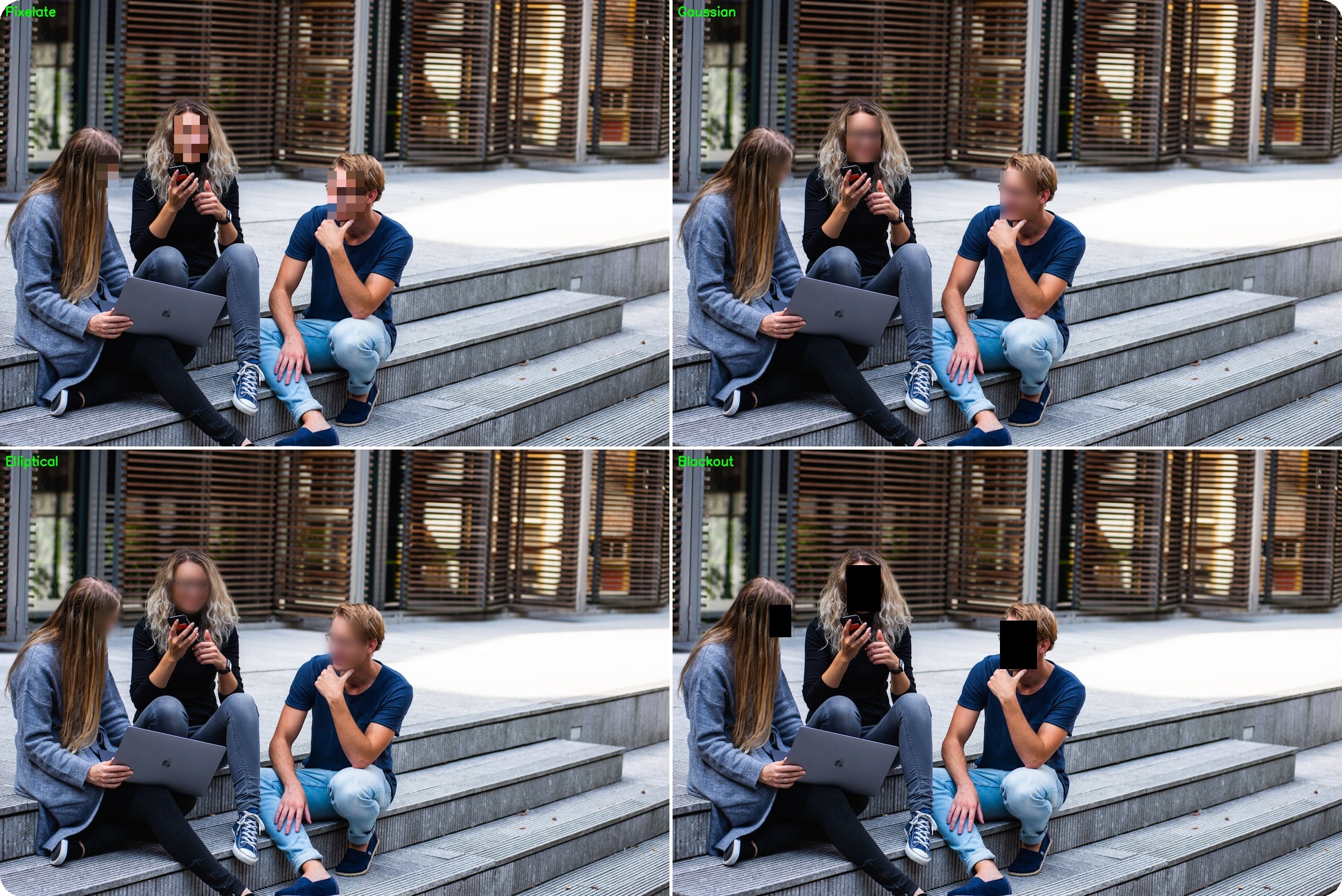
Face anonymization protects privacy by blurring or obscuring faces in images and videos.
|
|
|
|
<figure markdown="span">
|
|
{ width="100%" }
|
|
<figcaption>Five anonymization methods: pixelate, gaussian, blackout, elliptical, and median</figcaption>
|
|
</figure>
|
|
|
|
---
|
|
|
|
## Available Methods
|
|
|
|
| Method | Description |
|
|
|--------|-------------|
|
|
| **pixelate** | Blocky pixelation |
|
|
| **gaussian** | Smooth blur |
|
|
| **blackout** | Solid color fill |
|
|
| **elliptical** | Oval-shaped blur |
|
|
| **median** | Edge-preserving blur |
|
|
|
|
---
|
|
|
|
## Quick Start
|
|
|
|
```python
|
|
from uniface.detection import RetinaFace
|
|
from uniface.privacy import BlurFace
|
|
import cv2
|
|
|
|
detector = RetinaFace()
|
|
blurrer = BlurFace(method='gaussian', blur_strength=5.0)
|
|
|
|
image = cv2.imread("photo.jpg")
|
|
faces = detector.detect(image)
|
|
anonymized = blurrer.anonymize(image, faces)
|
|
|
|
cv2.imwrite("anonymized.jpg", anonymized)
|
|
```
|
|
|
|
---
|
|
|
|
## Blur Methods
|
|
|
|
### Pixelate
|
|
|
|
Blocky pixelation effect (common in news media):
|
|
|
|
```python
|
|
blurrer = BlurFace(method='pixelate', pixel_blocks=15)
|
|
```
|
|
|
|
| Parameter | Default | Description |
|
|
|-----------|---------|-------------|
|
|
| `pixel_blocks` | 15 | Number of blocks (lower = more pixelated) |
|
|
|
|
### Gaussian
|
|
|
|
Smooth, natural-looking blur:
|
|
|
|
```python
|
|
blurrer = BlurFace(method='gaussian', blur_strength=3.0)
|
|
```
|
|
|
|
| Parameter | Default | Description |
|
|
|-----------|---------|-------------|
|
|
| `blur_strength` | 3.0 | Blur intensity (higher = more blur) |
|
|
|
|
### Blackout
|
|
|
|
Solid color fill for maximum privacy:
|
|
|
|
```python
|
|
blurrer = BlurFace(method='blackout', color=(0, 0, 0))
|
|
```
|
|
|
|
| Parameter | Default | Description |
|
|
|-----------|---------|-------------|
|
|
| `color` | (0, 0, 0) | Fill color (BGR format) |
|
|
|
|
### Elliptical
|
|
|
|
Oval-shaped blur matching natural face shape:
|
|
|
|
```python
|
|
blurrer = BlurFace(method='elliptical', blur_strength=3.0, margin=20)
|
|
```
|
|
|
|
| Parameter | Default | Description |
|
|
|-----------|---------|-------------|
|
|
| `blur_strength` | 3.0 | Blur intensity |
|
|
| `margin` | 20 | Margin around face |
|
|
|
|
### Median
|
|
|
|
Edge-preserving blur with artistic effect:
|
|
|
|
```python
|
|
blurrer = BlurFace(method='median', blur_strength=3.0)
|
|
```
|
|
|
|
| Parameter | Default | Description |
|
|
|-----------|---------|-------------|
|
|
| `blur_strength` | 3.0 | Blur intensity |
|
|
|
|
---
|
|
|
|
## In-Place Processing
|
|
|
|
Modify image directly (faster, saves memory):
|
|
|
|
```python
|
|
blurrer = BlurFace(method='pixelate')
|
|
|
|
# In-place modification
|
|
result = blurrer.anonymize(image, faces, inplace=True)
|
|
# 'image' and 'result' point to the same array
|
|
```
|
|
|
|
---
|
|
|
|
## Real-Time Anonymization
|
|
|
|
### Webcam
|
|
|
|
```python
|
|
import cv2
|
|
from uniface.detection import RetinaFace
|
|
from uniface.privacy import BlurFace
|
|
|
|
detector = RetinaFace()
|
|
blurrer = BlurFace(method='pixelate')
|
|
|
|
cap = cv2.VideoCapture(0)
|
|
|
|
while True:
|
|
ret, frame = cap.read()
|
|
if not ret:
|
|
break
|
|
|
|
faces = detector.detect(frame)
|
|
frame = blurrer.anonymize(frame, faces, inplace=True)
|
|
|
|
cv2.imshow('Anonymized', frame)
|
|
|
|
if cv2.waitKey(1) & 0xFF == ord('q'):
|
|
break
|
|
|
|
cap.release()
|
|
cv2.destroyAllWindows()
|
|
```
|
|
|
|
### Video File
|
|
|
|
```python
|
|
import cv2
|
|
from uniface.detection import RetinaFace
|
|
from uniface.privacy import BlurFace
|
|
|
|
detector = RetinaFace()
|
|
blurrer = BlurFace(method='gaussian')
|
|
|
|
cap = cv2.VideoCapture("input_video.mp4")
|
|
fps = cap.get(cv2.CAP_PROP_FPS)
|
|
width = int(cap.get(cv2.CAP_PROP_FRAME_WIDTH))
|
|
height = int(cap.get(cv2.CAP_PROP_FRAME_HEIGHT))
|
|
|
|
fourcc = cv2.VideoWriter_fourcc(*'mp4v')
|
|
out = cv2.VideoWriter('output_video.mp4', fourcc, fps, (width, height))
|
|
|
|
while True:
|
|
ret, frame = cap.read()
|
|
if not ret:
|
|
break
|
|
|
|
faces = detector.detect(frame)
|
|
frame = blurrer.anonymize(frame, faces, inplace=True)
|
|
out.write(frame)
|
|
|
|
cap.release()
|
|
out.release()
|
|
```
|
|
|
|
---
|
|
|
|
## Selective Anonymization
|
|
|
|
### Exclude Specific Faces
|
|
|
|
```python
|
|
def anonymize_except(image, all_faces, exclude_embeddings, recognizer, threshold=0.6):
|
|
"""Anonymize all faces except those matching exclude_embeddings."""
|
|
faces_to_blur = []
|
|
|
|
for face in all_faces:
|
|
# Get embedding
|
|
embedding = recognizer.get_normalized_embedding(image, face.landmarks)
|
|
|
|
# Check if should be excluded
|
|
should_exclude = False
|
|
for ref_emb in exclude_embeddings:
|
|
similarity = np.dot(embedding, ref_emb.T)[0][0]
|
|
if similarity > threshold:
|
|
should_exclude = True
|
|
break
|
|
|
|
if not should_exclude:
|
|
faces_to_blur.append(face)
|
|
|
|
# Blur remaining faces
|
|
return blurrer.anonymize(image, faces_to_blur)
|
|
```
|
|
|
|
### Confidence-Based
|
|
|
|
```python
|
|
def anonymize_low_confidence(image, faces, blurrer, confidence_threshold=0.8):
|
|
"""Anonymize faces below confidence threshold."""
|
|
faces_to_blur = [f for f in faces if f.confidence < confidence_threshold]
|
|
return blurrer.anonymize(image, faces_to_blur)
|
|
```
|
|
|
|
---
|
|
|
|
## Comparison
|
|
|
|
```python
|
|
import cv2
|
|
from uniface.detection import RetinaFace
|
|
from uniface.privacy import BlurFace
|
|
|
|
detector = RetinaFace()
|
|
image = cv2.imread("photo.jpg")
|
|
faces = detector.detect(image)
|
|
|
|
methods = ['pixelate', 'gaussian', 'blackout', 'elliptical', 'median']
|
|
|
|
for method in methods:
|
|
blurrer = BlurFace(method=method)
|
|
result = blurrer.anonymize(image.copy(), faces)
|
|
cv2.imwrite(f"anonymized_{method}.jpg", result)
|
|
```
|
|
|
|
---
|
|
|
|
## Command-Line Tool
|
|
|
|
```bash
|
|
# Anonymize image with pixelation
|
|
python tools/anonymize.py --source photo.jpg
|
|
|
|
# Real-time webcam
|
|
python tools/anonymize.py --source 0 --method gaussian
|
|
|
|
# Custom blur strength
|
|
python tools/anonymize.py --source photo.jpg --method gaussian --blur-strength 5.0
|
|
```
|
|
|
|
---
|
|
|
|
## Next Steps
|
|
|
|
- [Anonymize Stream Recipe](../recipes/anonymize-stream.md) - Video pipeline
|
|
- [Detection](detection.md) - Face detection options
|
|
- [Batch Processing Recipe](../recipes/batch-processing.md) - Process multiple files
|